UX Research & Design
Library of Congress
Improving the discovery experience across loc.gov, the LOC catalog, and Stacks — a 9-month capstone project with the Library of Congress.
Overview
The Library of Congress is embarking on a multi-year project to replace its integrated library system (ILS). Our team was tasked with understanding the user experience that LOC patrons have with the existing ILS — specifically the discovery layer — and developing design concepts based on our findings.
The project was organized into five sprints, each with a different focus area but following the same stages: mapping, sketching, deciding, prototyping, and testing.
Research Contributions
- Study design across 5 sprints
- Contextual interviews and data analysis
- Competitive analysis and lightning demos (Sprint 1)
- Card sorting with MaxDiff analysis (Sprint 4)
- Coordinated research and design teams (Sprint 4)
- Edited testing tasks and proofread scripts across all sprints
TL;DR
This is a long one — five sprints of work documented in full. Use the sprint nav to jump around, or read through.
Our team of five spent nine months with the Library of Congress working on one deceptively simple problem: patrons navigating between loc.gov, the catalog, and Stacks kept getting lost, because nothing guided them between systems. We were tasked with redesigning that discovery layer.
I owned research design across all five sprints — study planning, contextual interviews, competitive analysis (S1), card sorting with MaxDiff analysis (S4). On the design side, I built the natural-language advanced search (S3), the top navigation and footer sitemap (S4), and led the final loc.gov landing page (S5). Sprint 4 also put me in an unofficial project manager role, bridging research and design teams in real time.
The work ended with a fully linked prototype across all three systems, reviewed by LOC stakeholders and two external UX experts. The client said they hoped some of it would go live one day.
Final Prototype
Problem Statement
After our first meeting with the client, we narrowed the problem space down into a more specific and practical long-term goal for the entire project:
Improve the user's discovery experience between loc.gov, the LOC catalog, and Stacks by improving the presentation of functionalities to guide the user to the correct platform for their needs.
We divided our goal into three areas: the Library of Congress homepage, the LOC catalog, and Stacks (at the time, only available on computers on-site). We prioritized the LOC catalog and Stacks because our client expressed interest in learning about the experience of these two platforms and the potential for integrating them.
We chose not to follow the traditional approach of creating designs for all problem areas and iterating on them through every sprint. Instead, we favored workload management and quality. Starting midway through each sprint, we asked our client whether they wanted us to continue working on the current design or shift to a new focus area. We then used this to guide our contextual interviews, which ran concurrently with testing — giving us more context to work with in preparation for the next sprint. As a result, we were better informed to make decisions in each mapping stage.
The sprint began with the mapping stage, where we aligned our visions and formed a sprint goal by voting on the questions and concerns our team had with the current design of the LOC catalog.
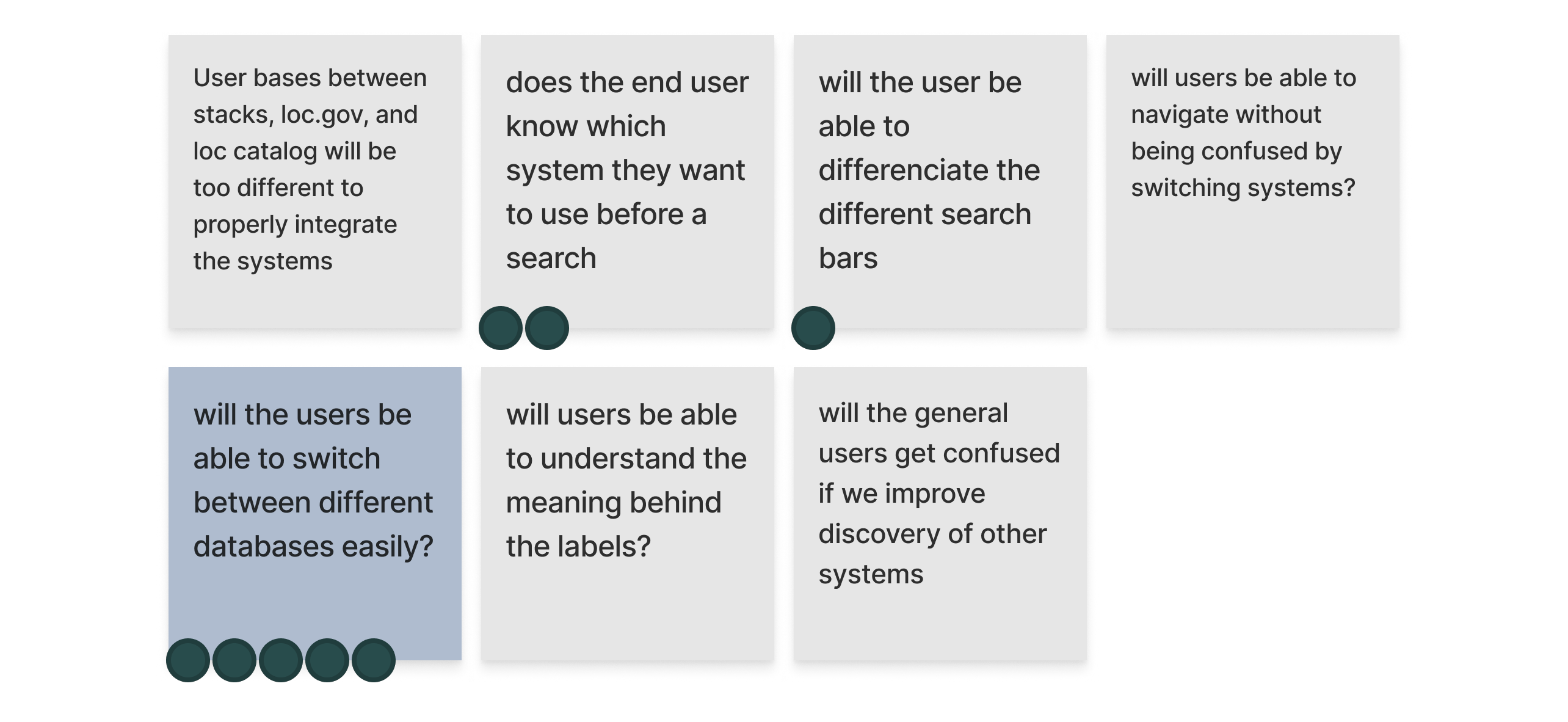
Sprint 1 — sprint questions
Combining our top questions with prior knowledge from our client, we brainstormed and voted on How Might We (HMW) questions to inform the focus of the sprint.
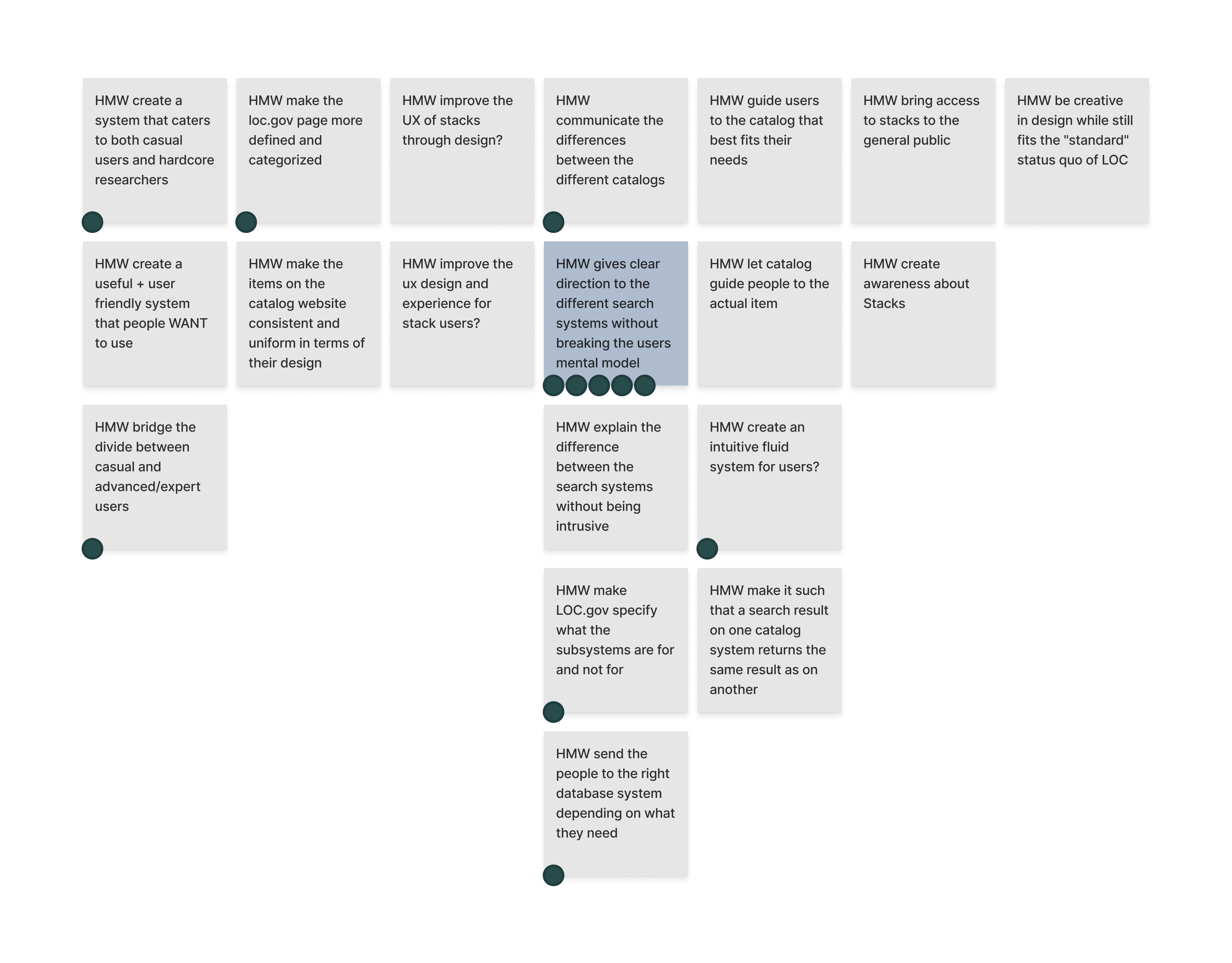
Sprint 1 — How Might We's
We also created a user flow to visualize any blocks or overlaps during the discovery (search and browse) phase on the LOC catalog.
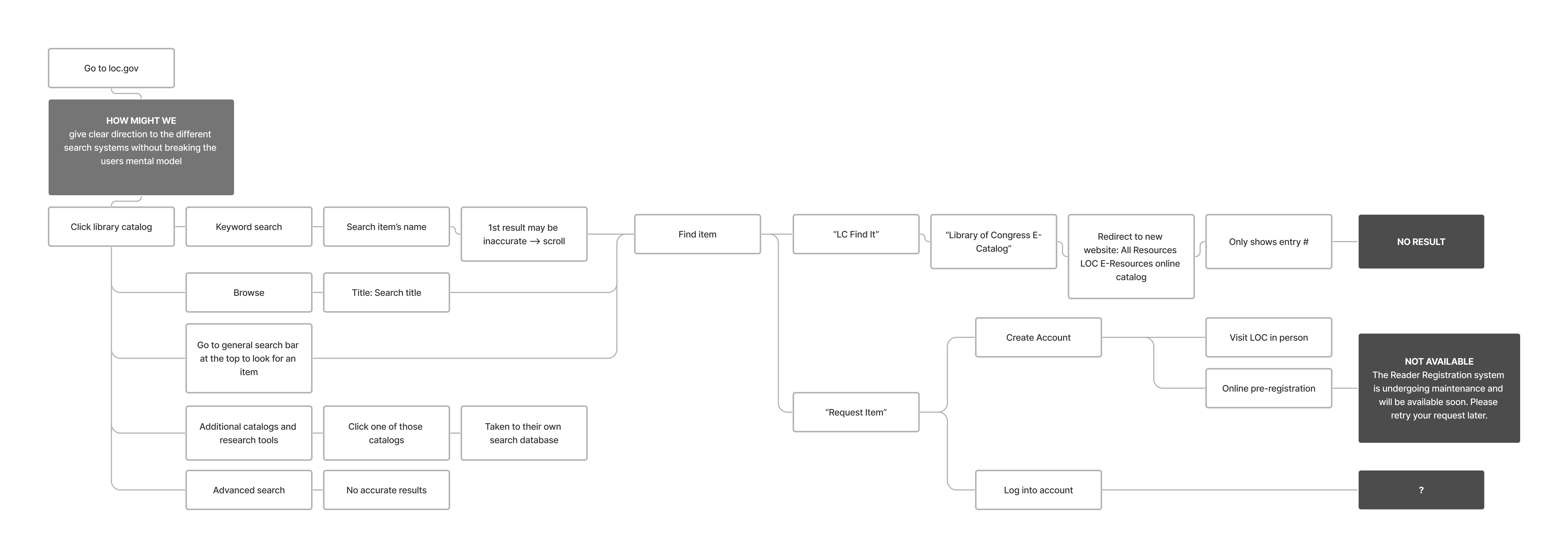
Sprint 1 — user map with HMW integrated
The user flow revealed two pain points:
- No clear guidance on which catalog to use (main catalog vs. additional research tools, etc.)
- Multiple dead ends in steps involving account registration and logging in
Our team decided to focus on the first pain point, which allowed for more design possibilities, since the second one mainly concerned backend logistical issues. Combining insights from our competitive analysis and inspirations from lightning demos, each team member produced one solution sketch addressing our sprint questions and HMW's. We then put all our sketches together and invited our stakeholders to an online critique session, where they commented on our sketches and dot-voted for their favorite ideas.
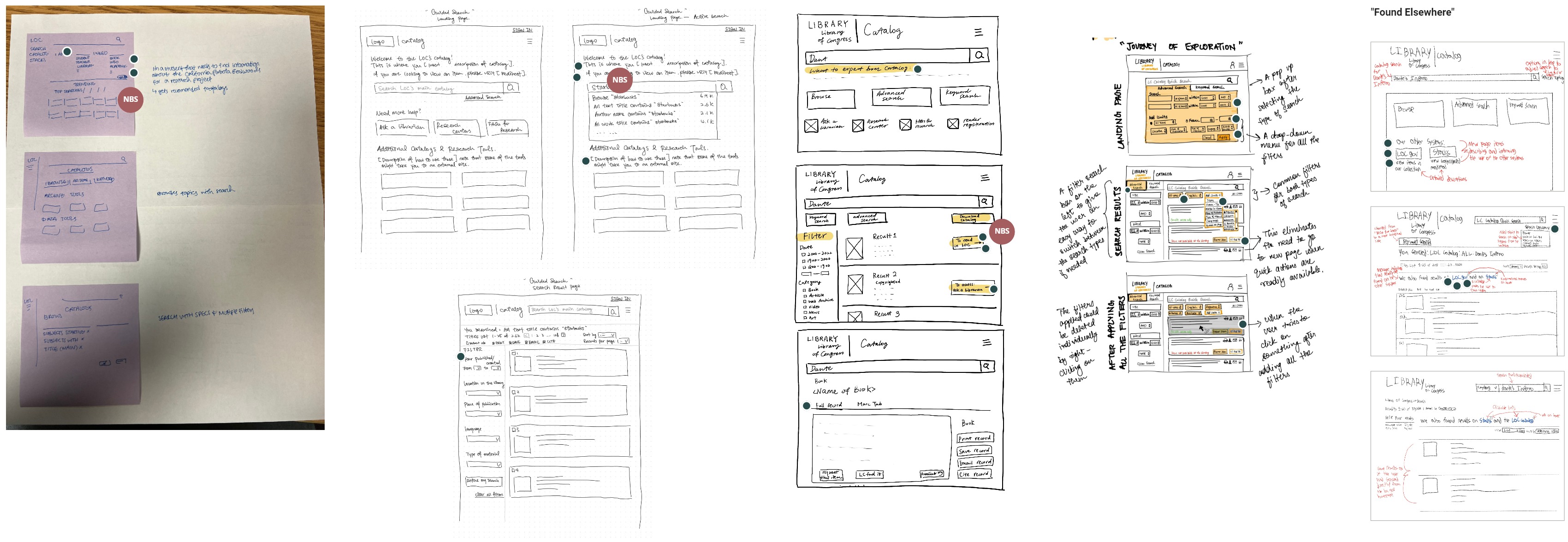
Sprint 1 — sketches
Our stakeholder was inspired by (the highlighted ideas are from my sketch):
- "I am… I need…" — a persona-based search suggestion system that provides guidance to the appropriate search tool based on the user's need and expertise
- Welcoming text — a concise message at the top of the homepage that welcomes the user and clearly explains the purpose and use of the catalog, also improving accessibility for screen reader users
- Search facet in the search box — a feature that provides a "preview" of how search results could be filtered right under the search box, suggesting different search granularity for the user to consider
- Differentiated actions on the results page — a new way to design CTAs that shows allowed actions (borrow vs. ask a librarian, etc.) directly on the results page for convenience and possible next steps
To help us stitch these ideas together into one coherent application, we composed a storyboard to see exactly where they fit in.
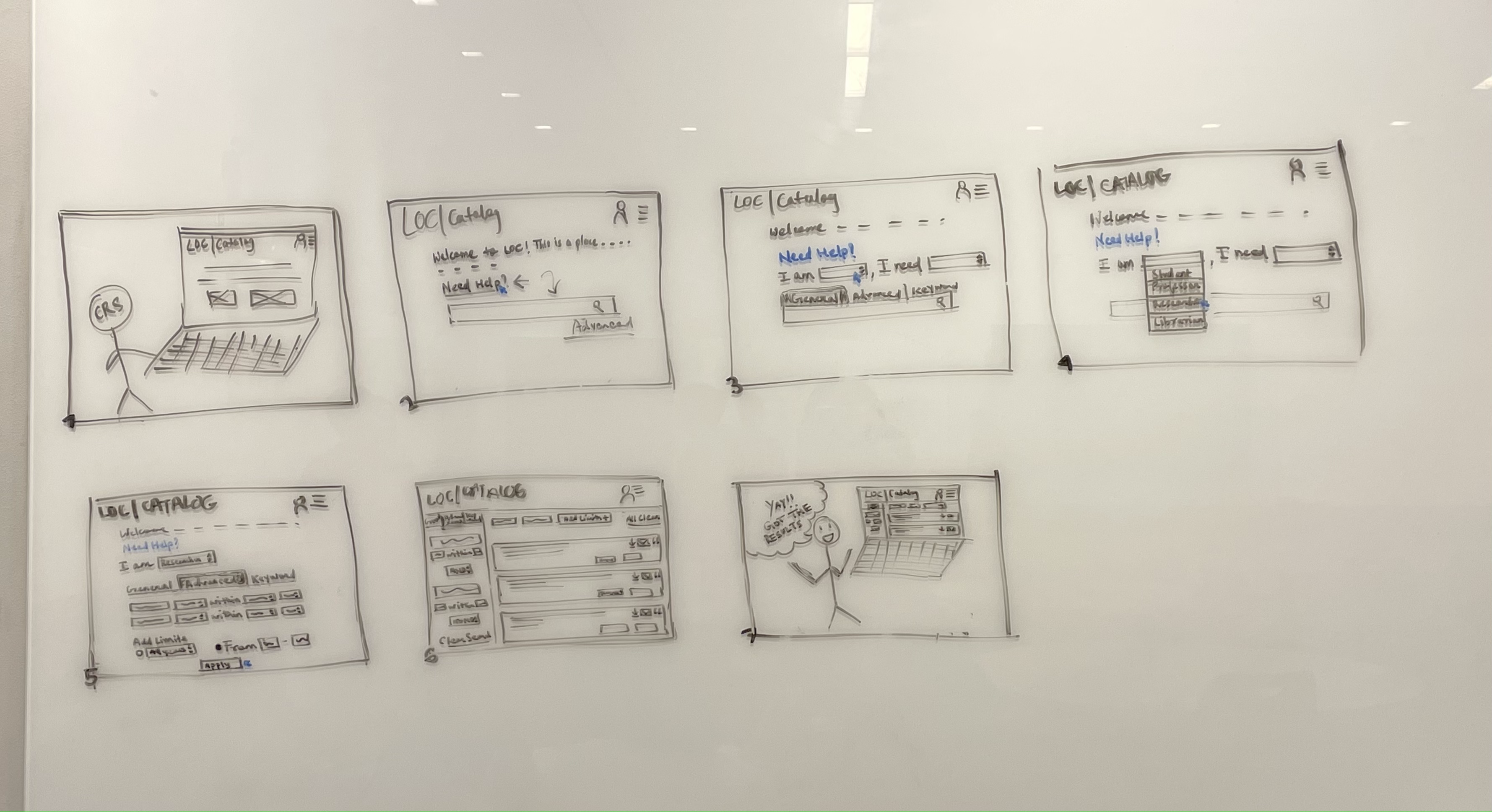
Sprint 1 — storyboard
In one week, we produced a minimum viable prototype for three experts to test.
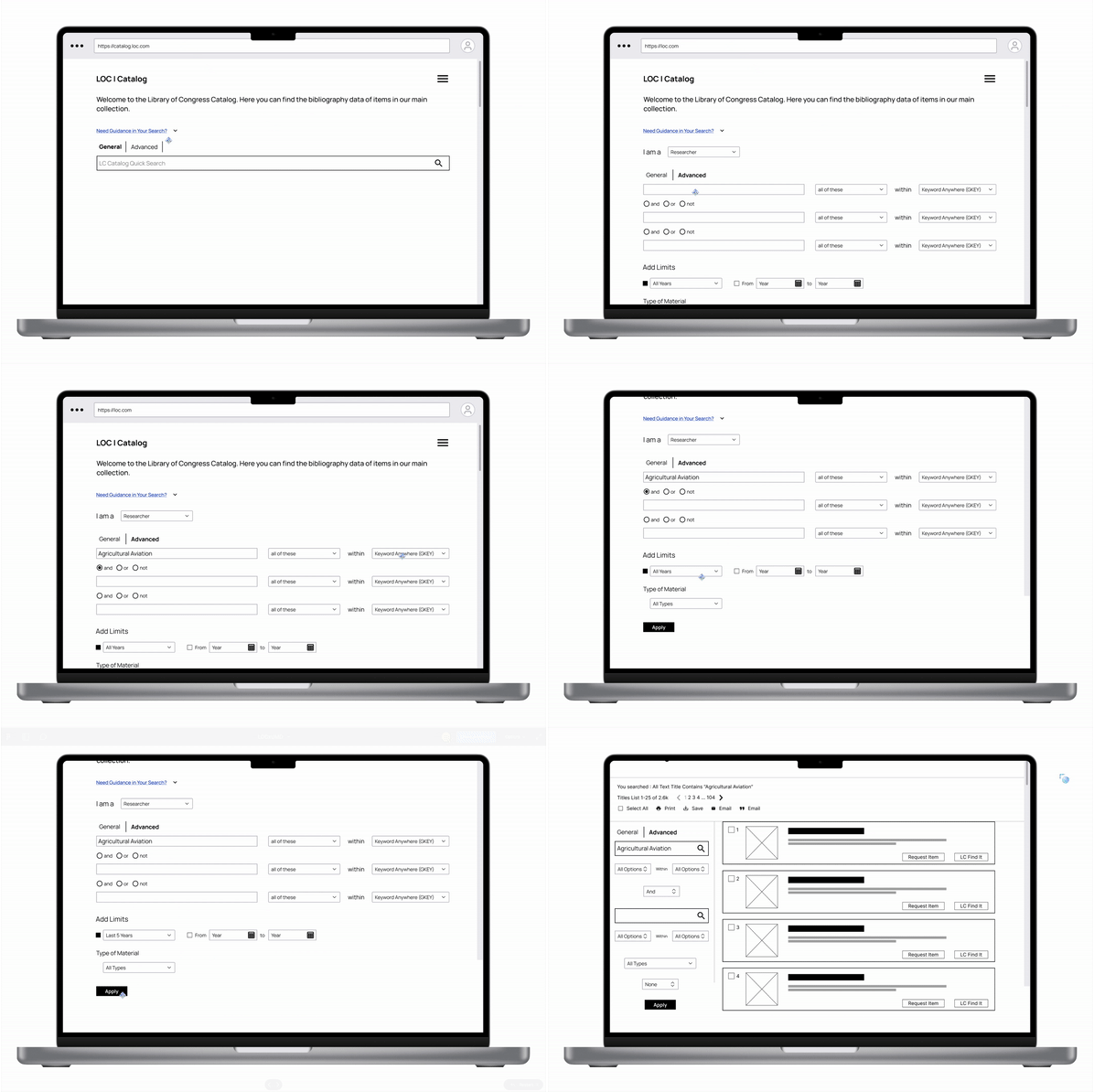
Sprint 1 — prototype walkthrough
During testing, we found that users need:
Personalization
- A personalized ranking of search results
- Confirmation of the search query
- Guidance on how to divide the search facets
Intuitive Functions
- Prominent filters that won't be overlooked
- Explanations for niche actions
- Contextual descriptions for tools
Functional Filters
- More control and specifications for filters
- Ability to filter initial results into facets
The biggest lesson from this sprint: all active CTA buttons and controls on the testing prototype must be obvious and intuitive with signifiers to avoid confusion, even for low-fidelity prototypes. Users tend to expect everything they see to be active — so if it's not ready to be implemented, don't include it in the testing prototype.
This rather experimental approach to a persona-based search also got me thinking about categorization in general — how do we sort users into different groups, and are these groups inclusive enough to cover all use cases? We eventually decided not to include this persona search feature in our final product for that reason. But if I were to do this project again, I would bring up this question earlier in the process, and we might have been able to develop a more flexible search scheme better suited for the platform.
We shifted our focus to Stacks for this sprint. The first challenge was that due to copyright restrictions, Stacks only existed as software on the on-site computers. To get an adequate understanding of the platform, the sprint started with our client providing a virtual walkthrough via Zoom.
With our understanding of the Stacks system, we formed our sprint questions using dot-voting on a collection of potential questions.
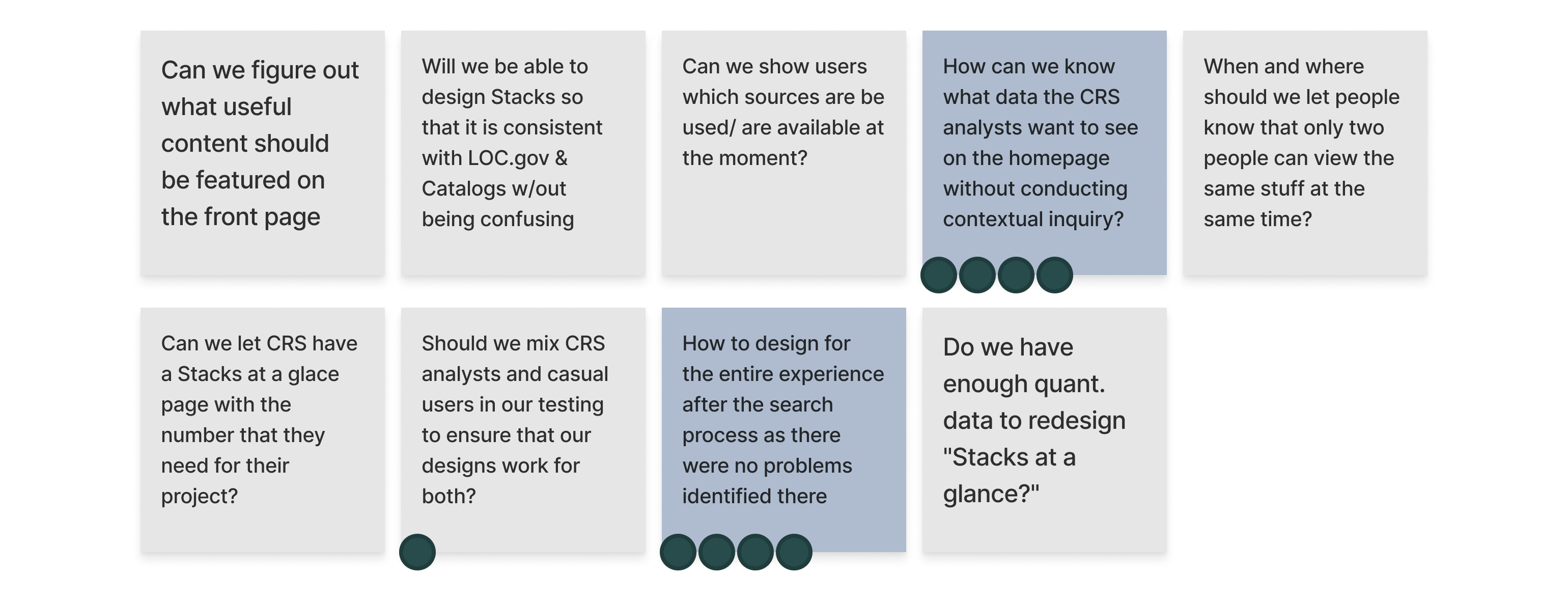
Sprint 2 — sprint questions
We recreated the user flow from the virtual walkthrough, then brainstormed and voted on our HMW questions and incorporated them into the flow.
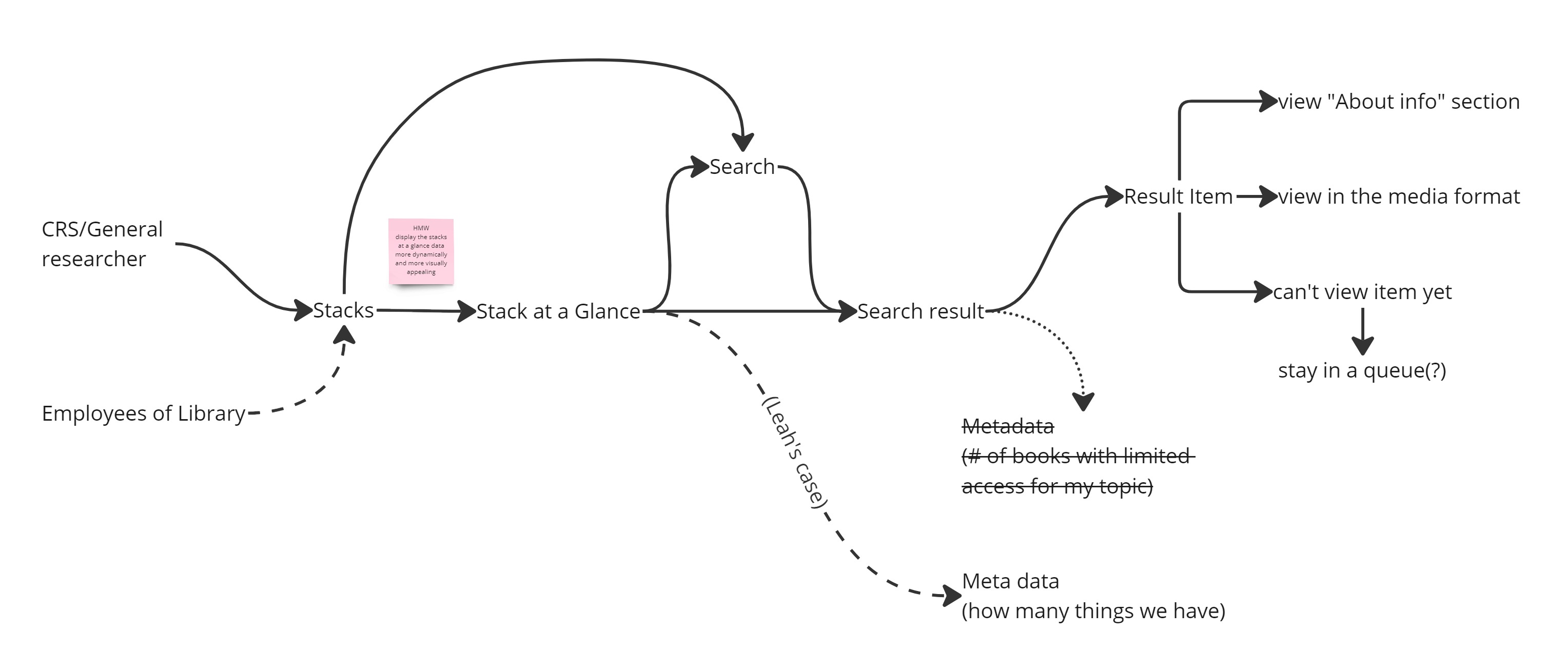
User map
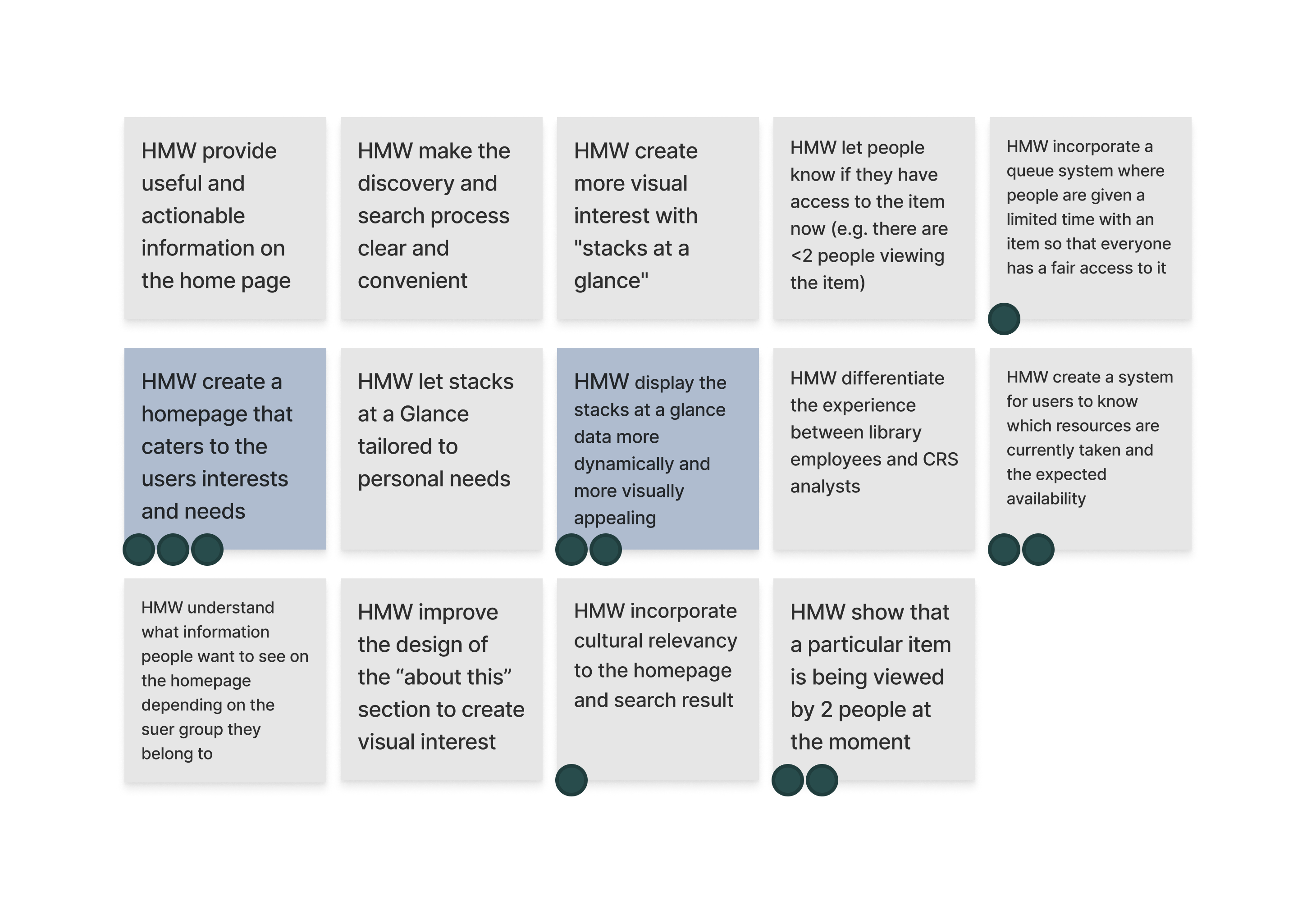
How Might We's
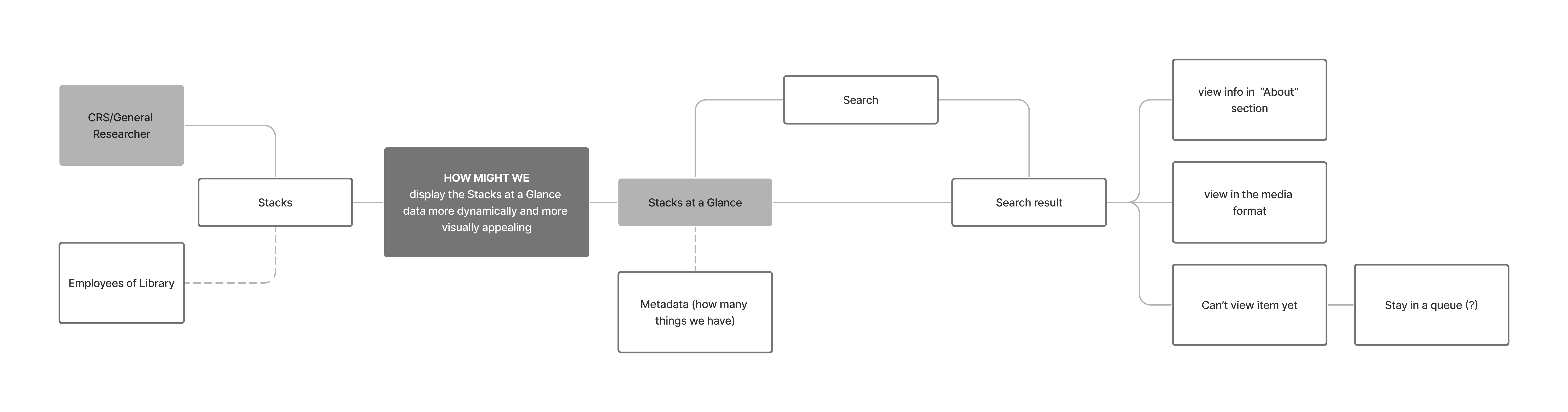
Integrated user map with HMW
Moving to the sketch stage, we each produced solution sketches. Our stakeholder voted on their favorite ideas using dots with their initials.
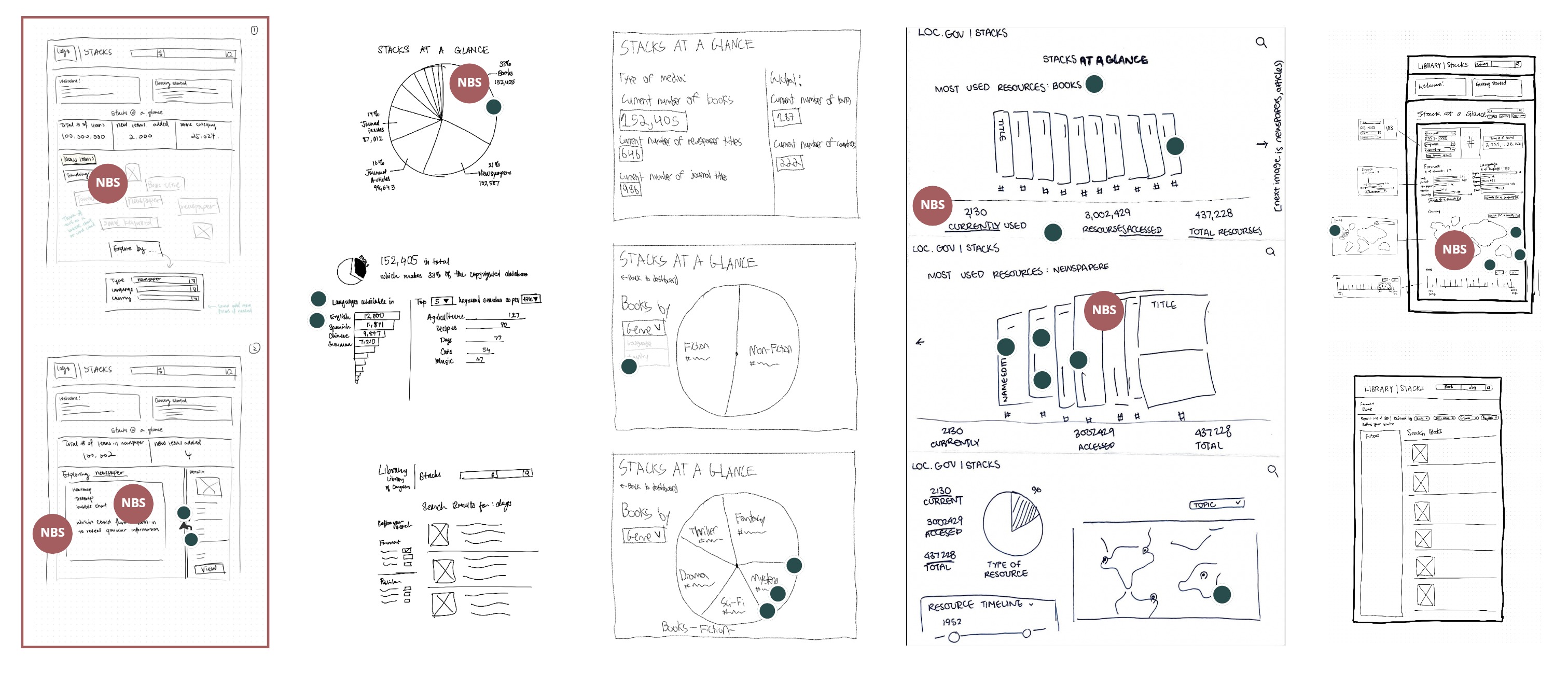
Sprint 2 — sketches (mine is boxed)
My solution sketch addressed the HMW question by:
- Adding a section on the landing page for recently added items and trending topics, useful for users researching current subjects or just browsing
- Adding an interactive data visualization alongside the "big numbers" so users can understand what's behind those statistics
- Suggesting a treemap or heatmap as the visualization structure to enable deep exploration of the Stacks catalog at different levels of granularity through filtering
We combined the strengths of different sketches into a storyboard showing a typical user interacting with the new data visualization:
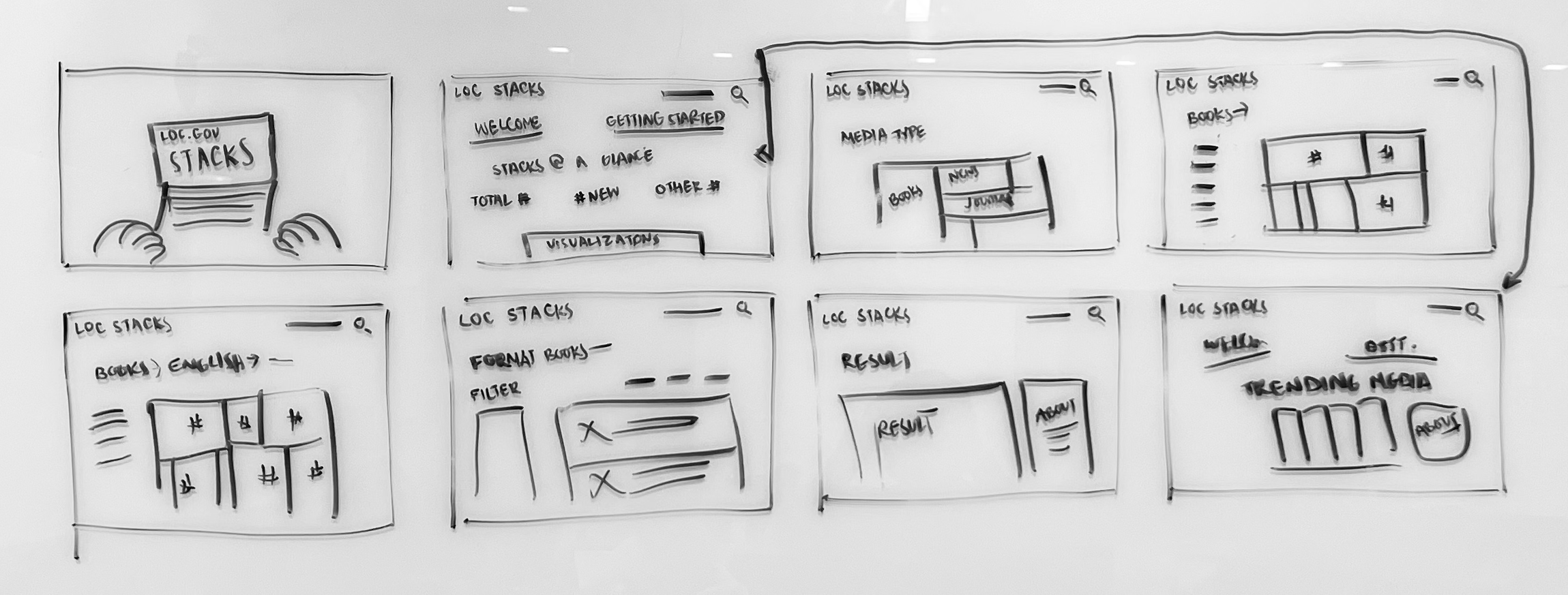
Sprint 2 — storyboard
And we transformed the storyboard into a mid-fidelity interactive prototype:
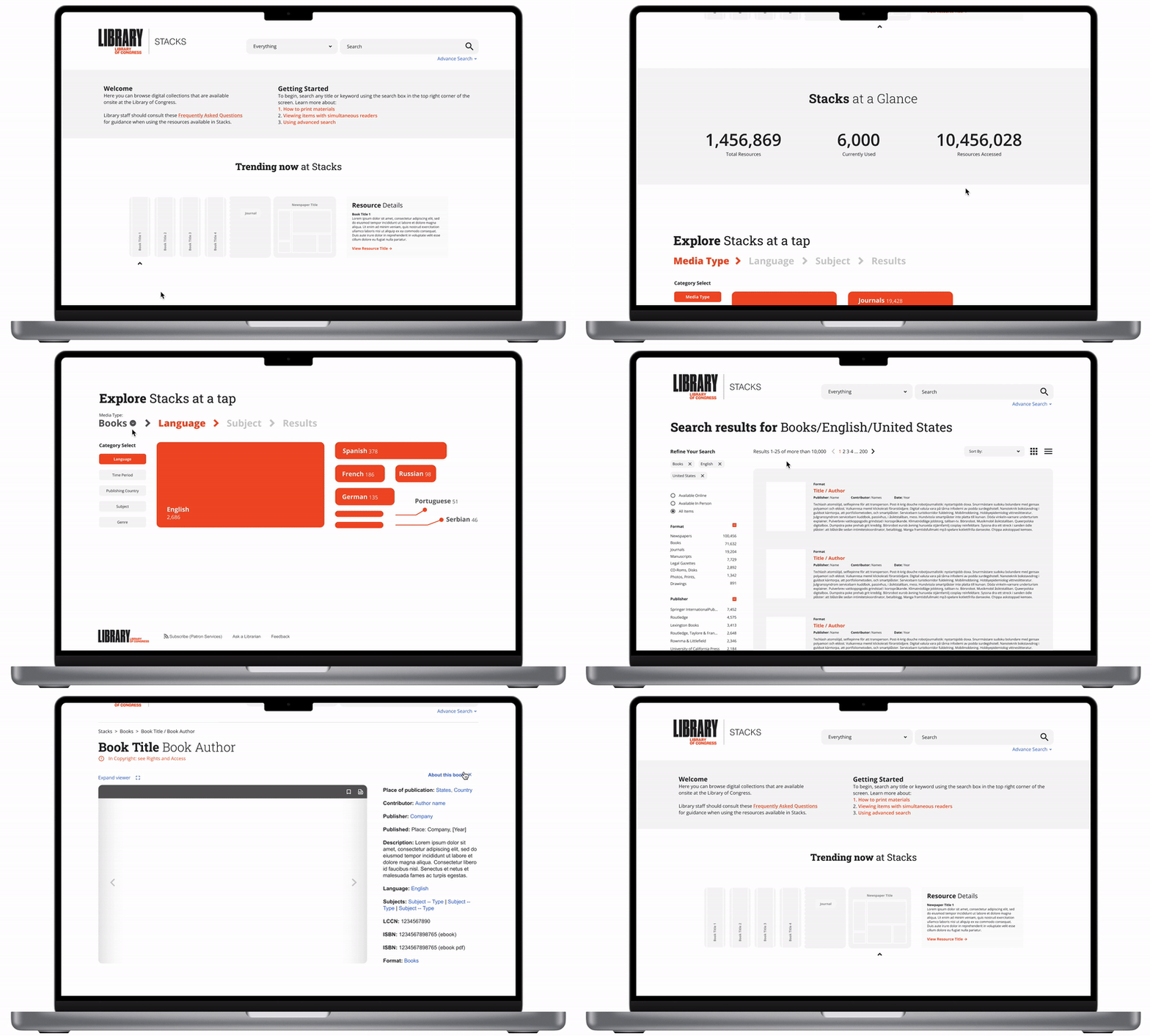
Sprint 2 — prototype walkthrough
Through testing and interviewing, we found that our users fell roughly into two groups:
Professionals want efficiency
- Need to find information under short deadlines
- Use external resources (Google Scholar, Amazon, etc.) to speed up the search process
- Know what they're doing — only switch search systems when required by the task or when results are exhausted
Casual users want differentiation
- Need to understand the difference between loc.gov, the LOC catalog, and Stacks
- Need a clear discovery layer to guide them to the most appropriate search system
- Don't want to be confused or overwhelmed by search results
Overall, our redesign of the "Stacks at a glance" section received positive feedback from testers, who said the treemap visualization encouraged exploration and added "elements of curiosity to a familiar interface."
The biggest lesson from this sprint was the value of storyboarding at the end of the deciding stage. We faced the challenge of connecting top ideas from sketches made by different team members, and storyboarding provided the opportunity to picture how all these features could help at different points throughout a typical user flow. I also wonder if the same approach could be applied to conflict resolution within teams — instead of arguing which idea to develop, set up a hypothetical situation and see if both ideas work together.
Sprint 3 continued and built on the work and findings from Sprint 1. The focus was straightforward, and we were more concerned with logistics and limited resources — which, in my opinion, was a good thing to keep in mind at the beginning of a sprint, because it grounded our thinking and made sure we could deliver on anything we promised.
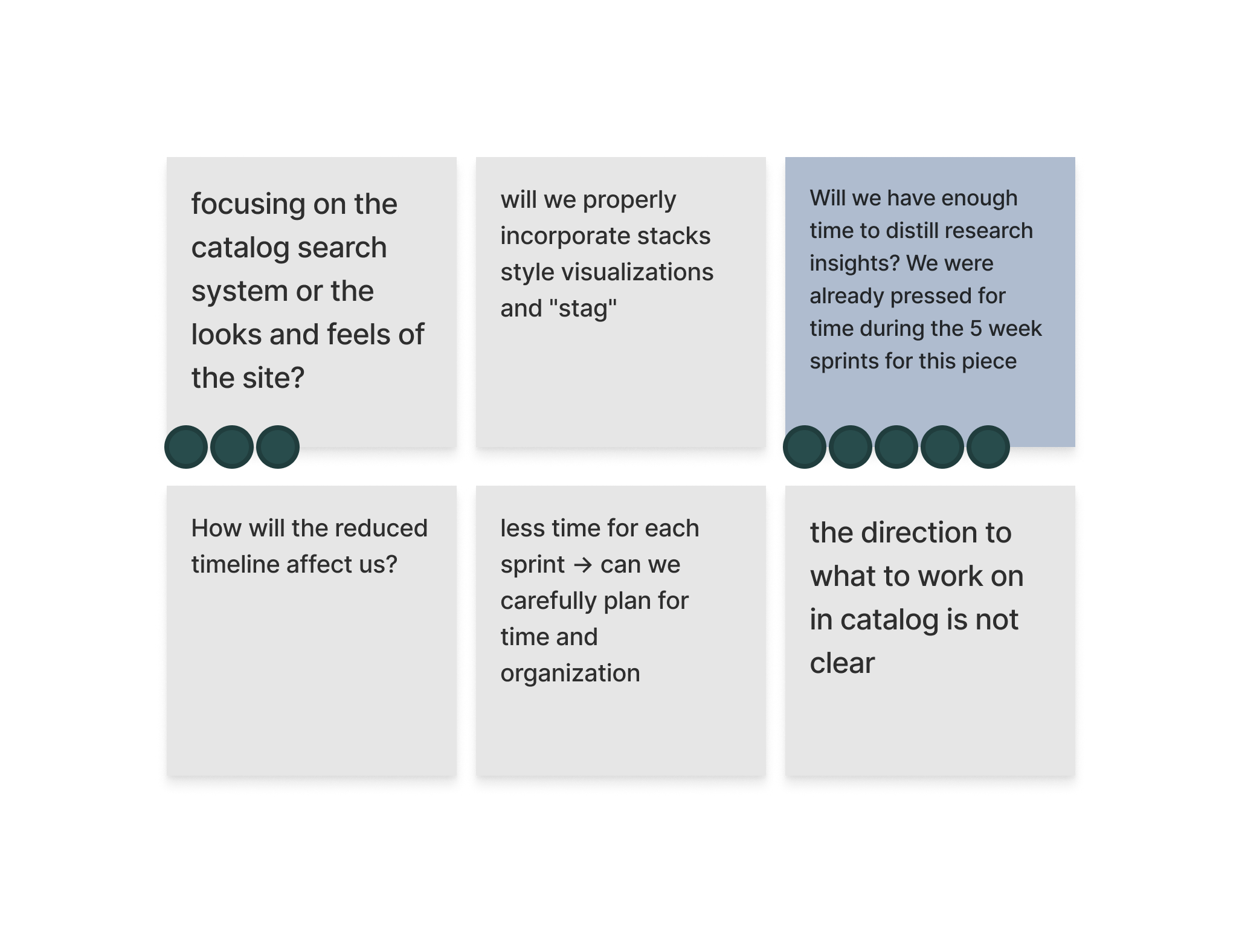
Sprint 3 — sprint questions
We brainstormed How Might We questions referencing the same user flow from Sprint 1, but with more background knowledge of the user and experience working with the design language.
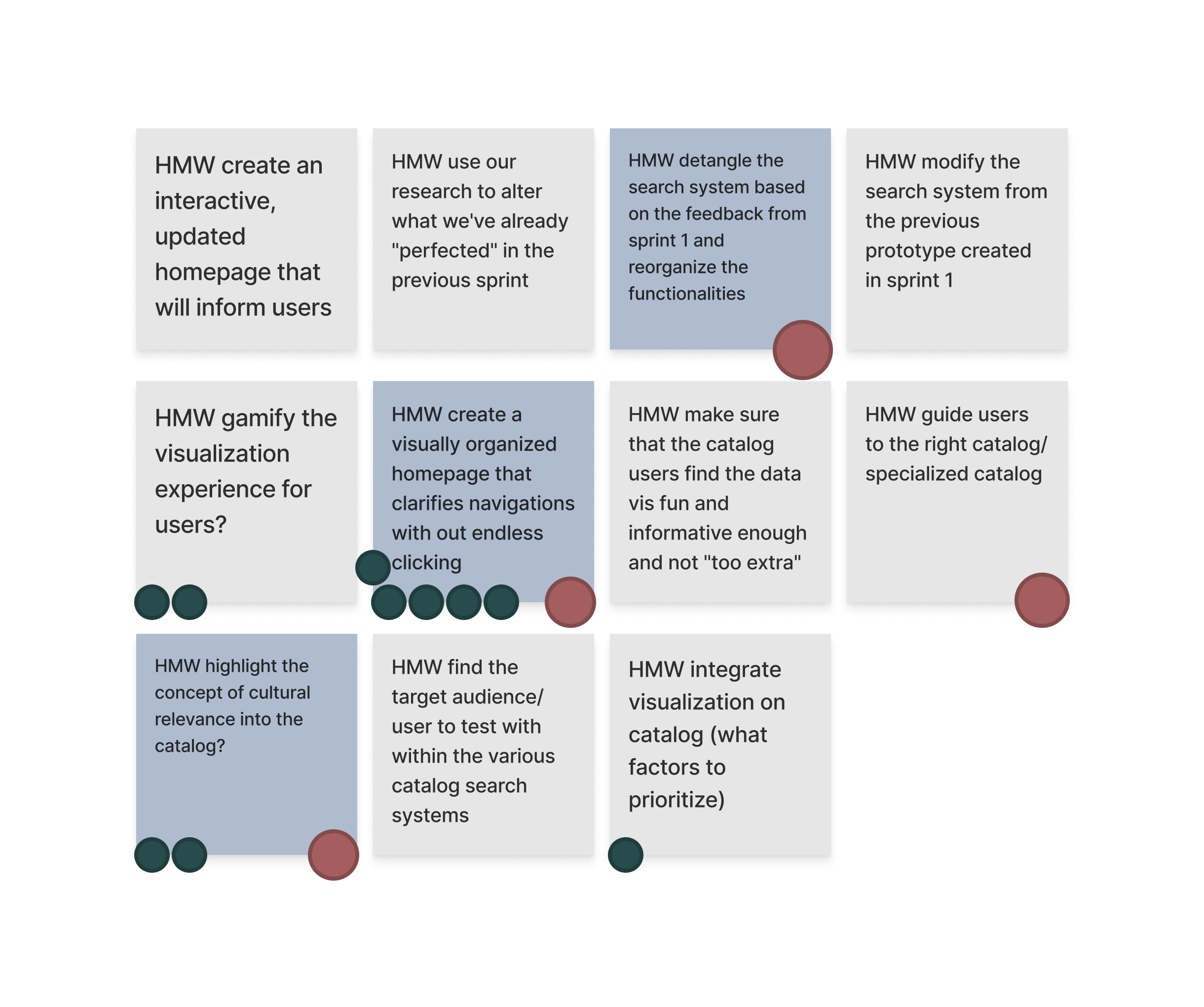
Sprint 3 — How Might We's
At the end of the mapping stage, we had two main questions to tackle:
- How might we organize the Catalog page so it is easy to navigate?
- How might we detangle the different search options and restructure them for ease of understanding and use?
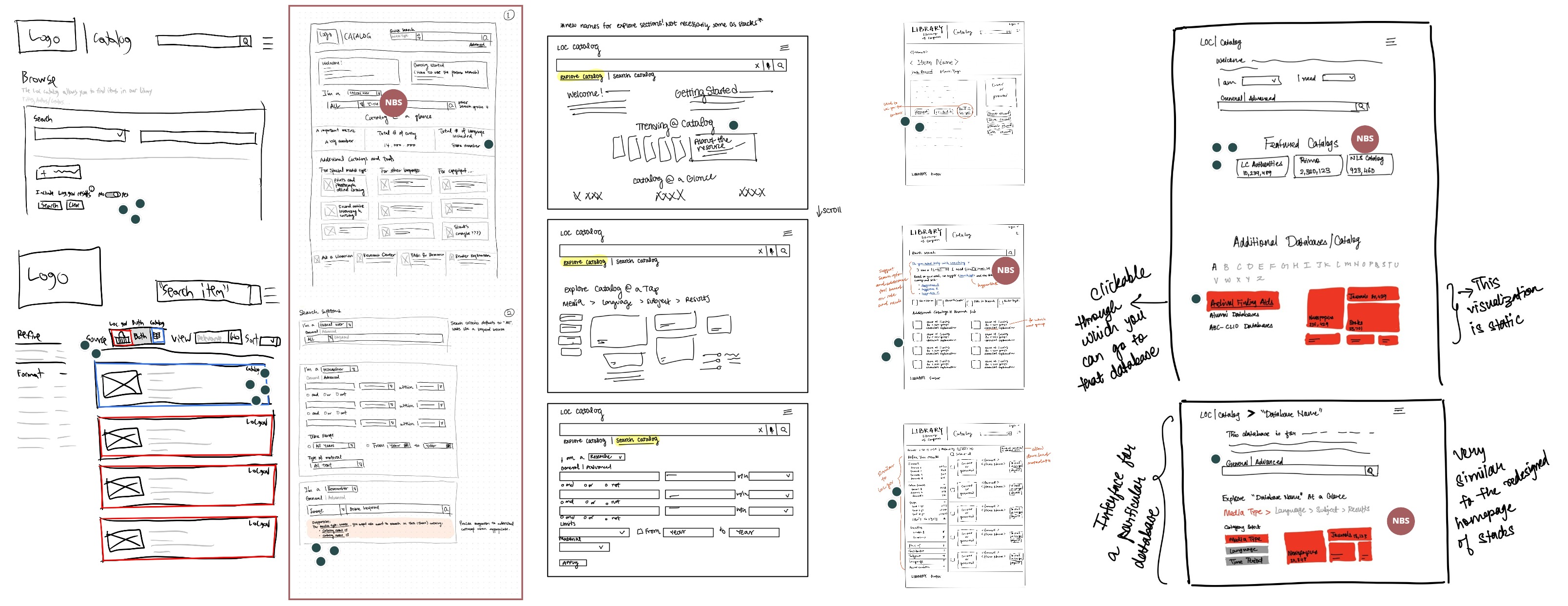
Sprint 3 — sketches (mine is second from the left)
My sketches focused on two areas:
- Reorganizing the content on the site, removing unnecessary or redundant features (e.g., browse and keyword search, which are similar to the main search bar, and the advanced search, which redirects to a new page), and creating more consistency across platforms by incorporating design ideas from the Stacks work in Sprint 2.
- Designing a new on-page search that consolidates all three search methods currently offered by the site, along with a helper text section that provides suggestions for additional catalogs based on the user's dropdown selections.
During storyboarding, we collectively felt that the advanced search function had potential to be more friendly to general users. I took the lead in designing this feature.
Inspired by natural language patterns, I designed an advanced search function that mimics the logic of how people think. I structured the input fields so that the search query flows and reads like a natural English sentence, making it easier to understand and increasing search accuracy.
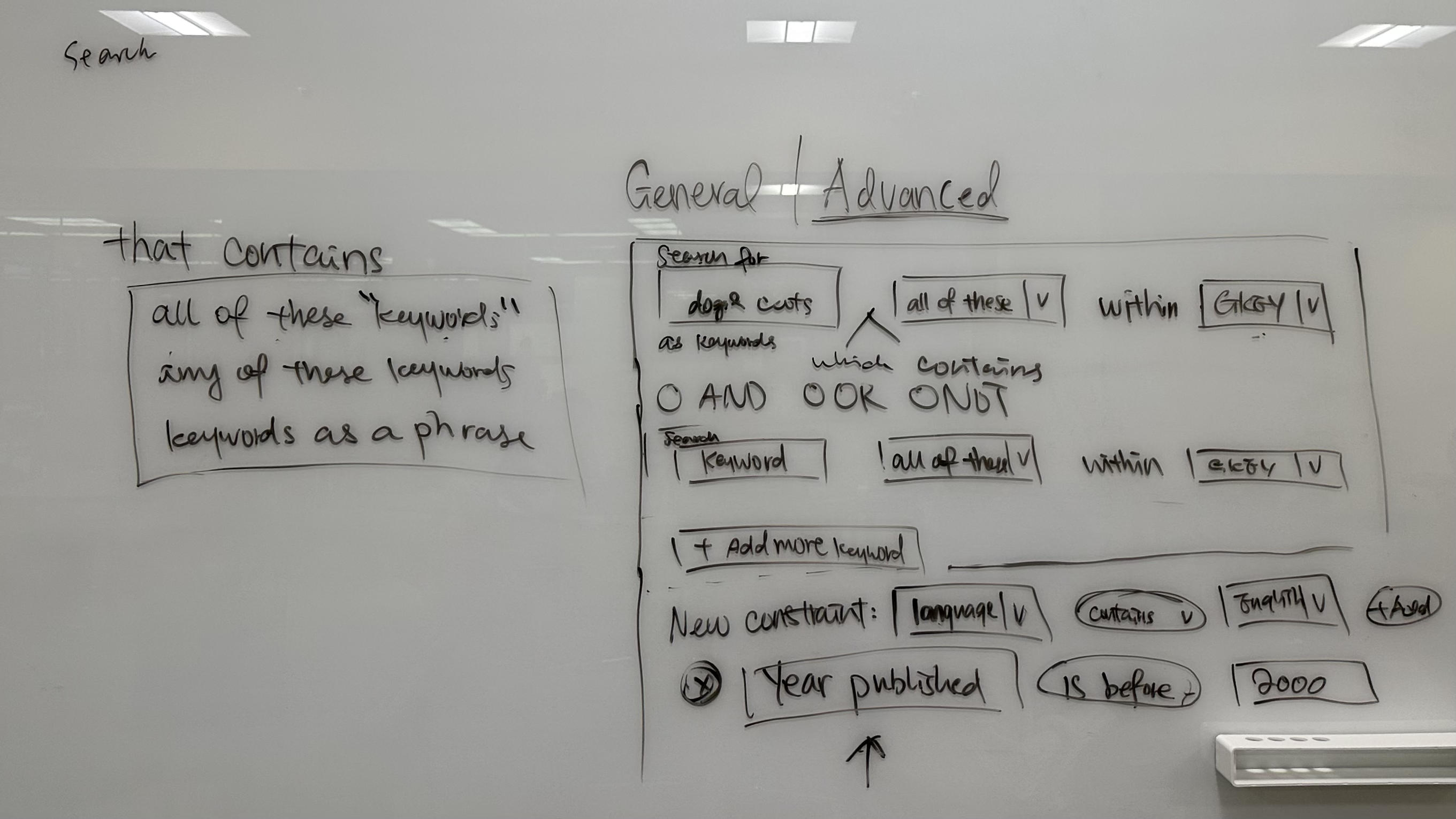
Sprint 3 — advanced search sketch
And this is what the feature looks like prototyped:
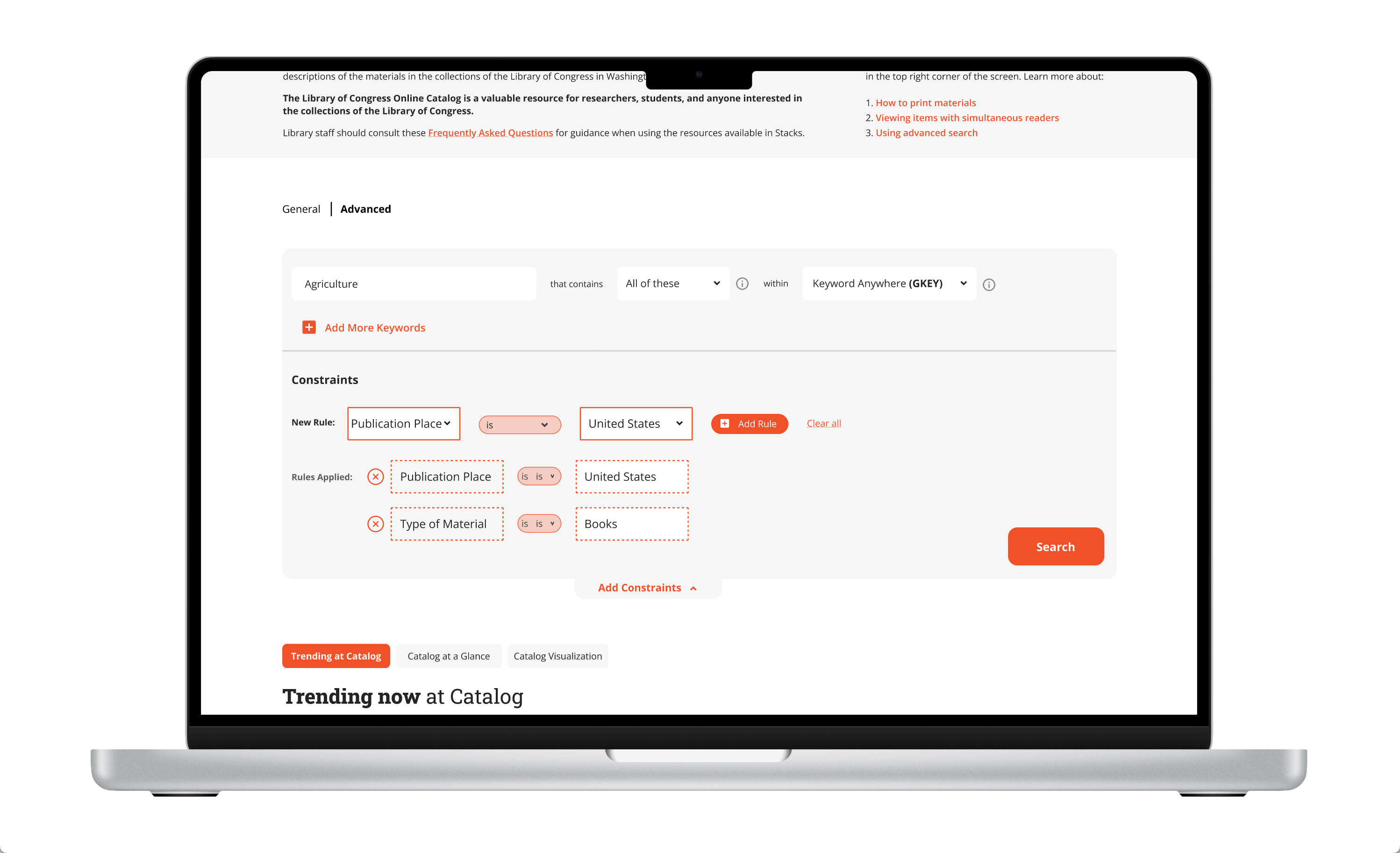
We received constructive feedback during testing. We annotated the prototype screenshots with user feedback on sticky notes, making it easy to understand and present to stakeholders.
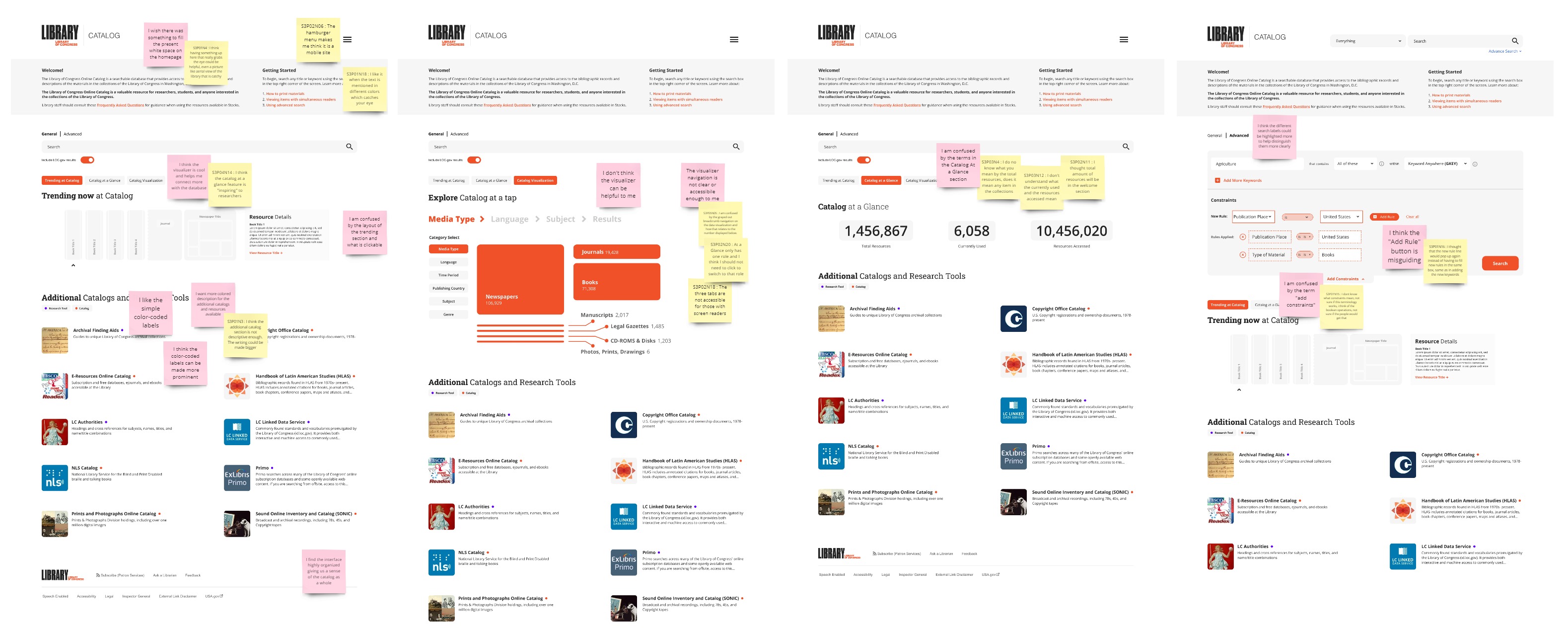
Sprint 3 — UX findings annotated on prototype screenshots
Based on the feedback, before delivering our final design, we would:
- Improve accessibility by adding a differentiating factor beyond color
- Use words users are most familiar with to maintain consistency across platforms
- Help users understand proactively by providing context and explanations for features
This sprint highlighted the importance of UX writing — how it can become a setback in the user experience, even if the language is technically accurate but misaligned with the user's mental model. As a non-native English speaker, this is something I continue to think about in every project.
I also learned more about designing for accessibility in practice. Colors should always be used in conjunction with other signifying elements to accommodate color-blind users, in addition to passing WCAG guidelines for contrast.
In our second-to-last sprint, we turned our focus to the loc.gov landing page — the entry point for the library's different systems: the digital collection (hosted on loc.gov), the main catalog and links to additional catalogs, and Stacks (to be available remotely in the future).
At the beginning of the sprint, I suggested splitting into two groups of two after the decide stage. One group would focus on designing and prototyping, while the other would focus on user research to guide and validate design decisions. I worked between the two groups to track progress, serve as a point of contact, and offer extra help where needed.
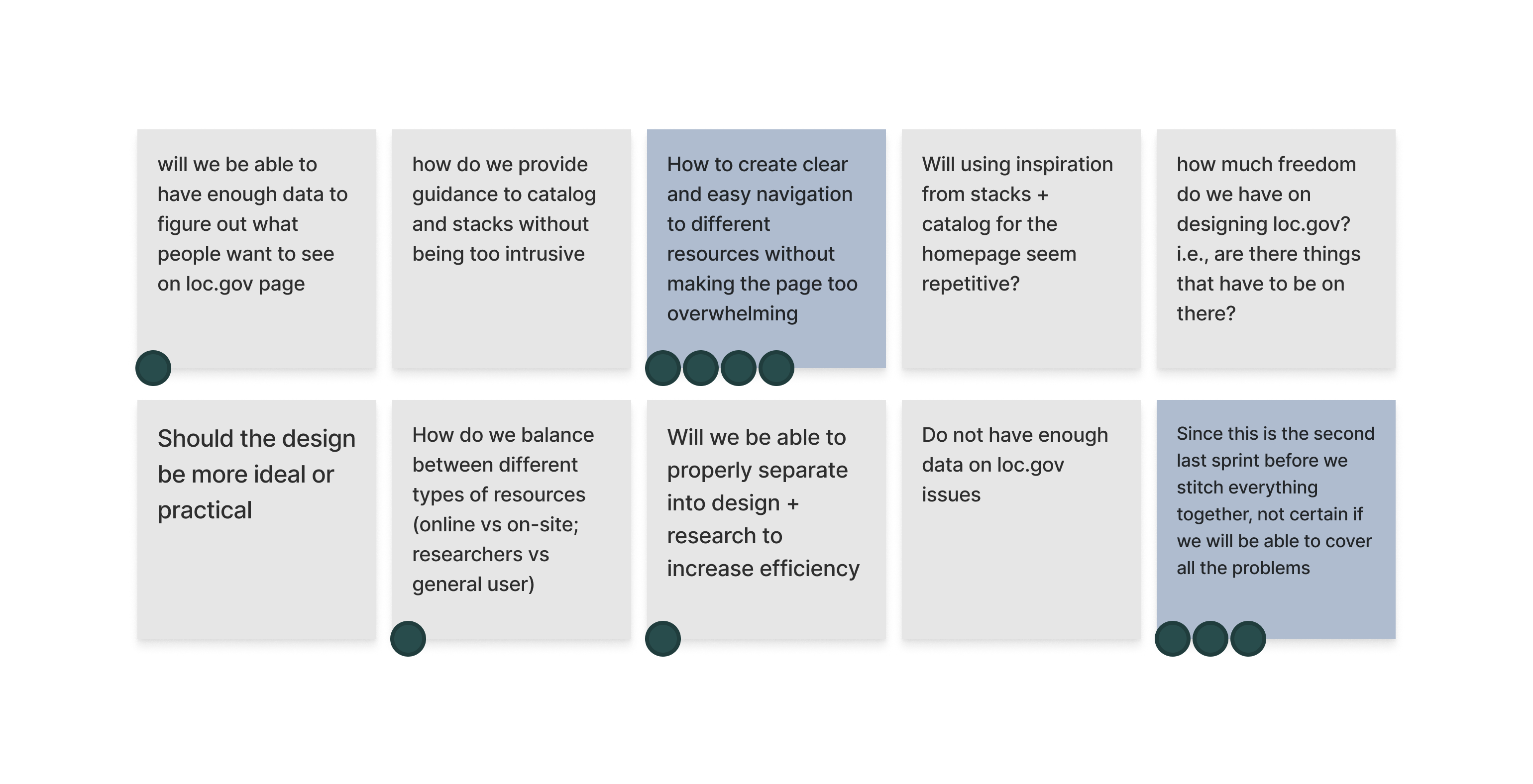
Sprint 4 — sprint questions
To focus on a specific goal, we decided to differentiate users based on the accuracy of their mental models. Our objective was to ensure the correct information was displayed and that users were guided to the appropriate search platform, even if their mental model of the site and system was not entirely accurate.
We mapped out the flow for two types of users:
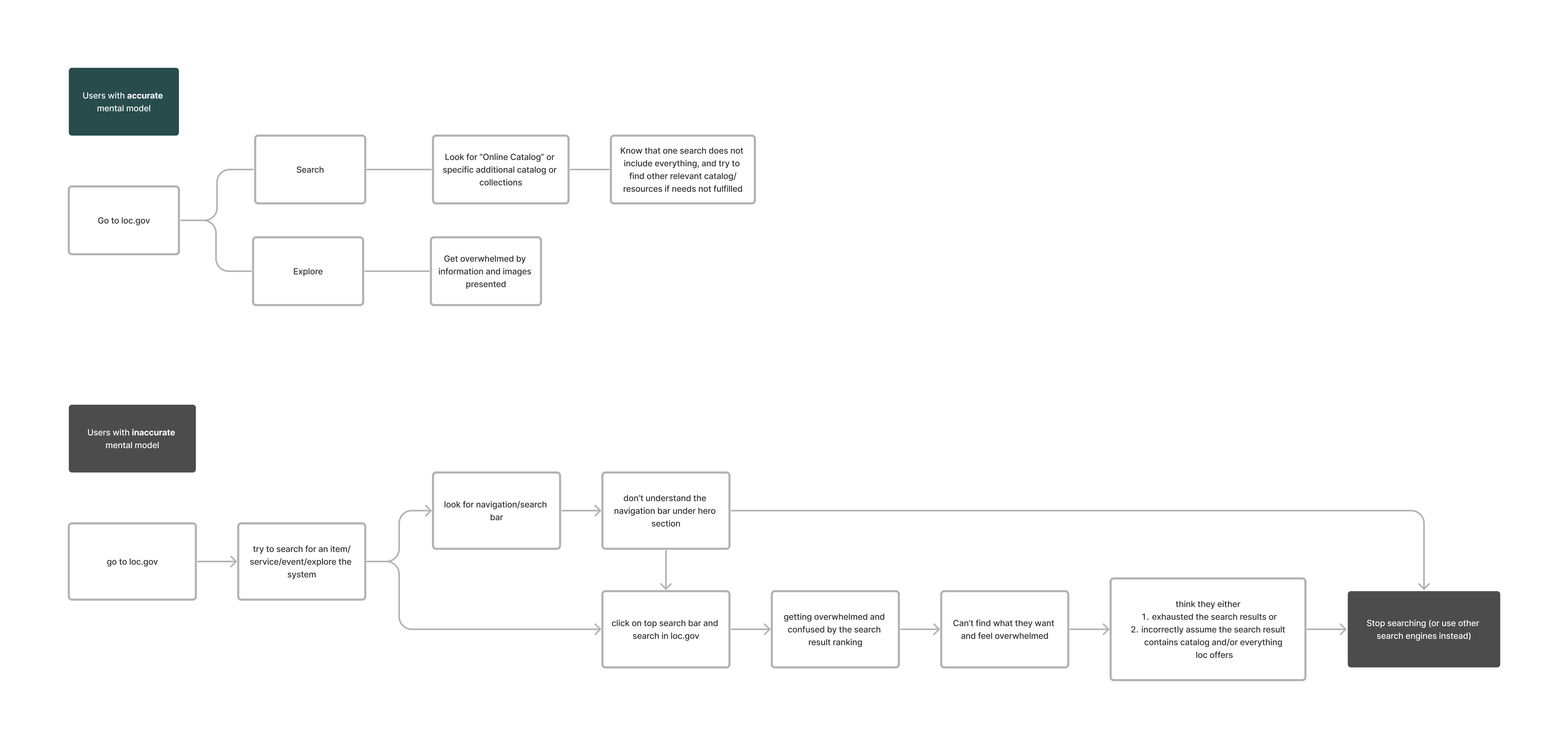
Sprint 4 — user maps
Based on the user flow maps, we brainstormed HMW questions to help mitigate the problems users face.
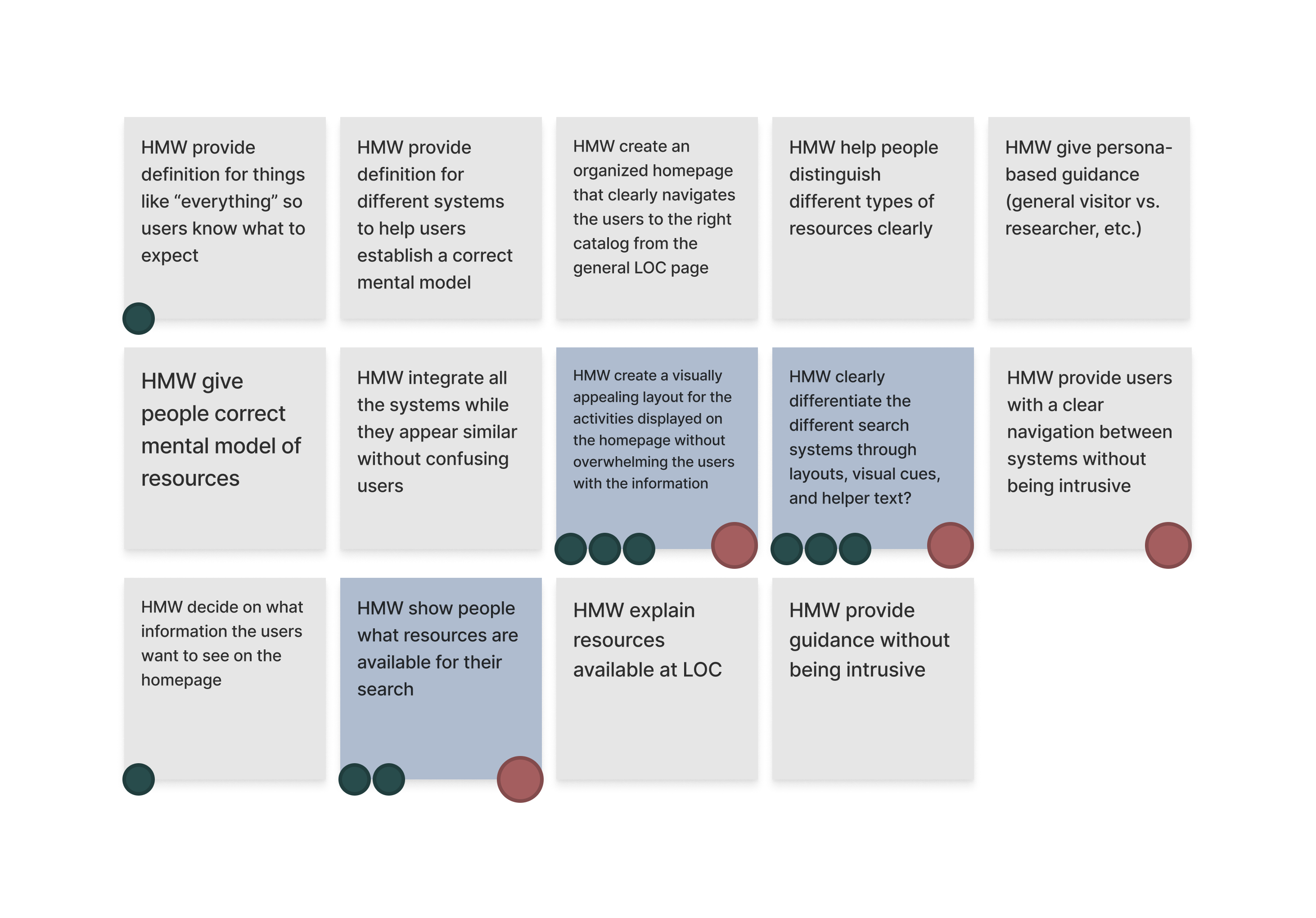
Sprint 4 — How Might We's
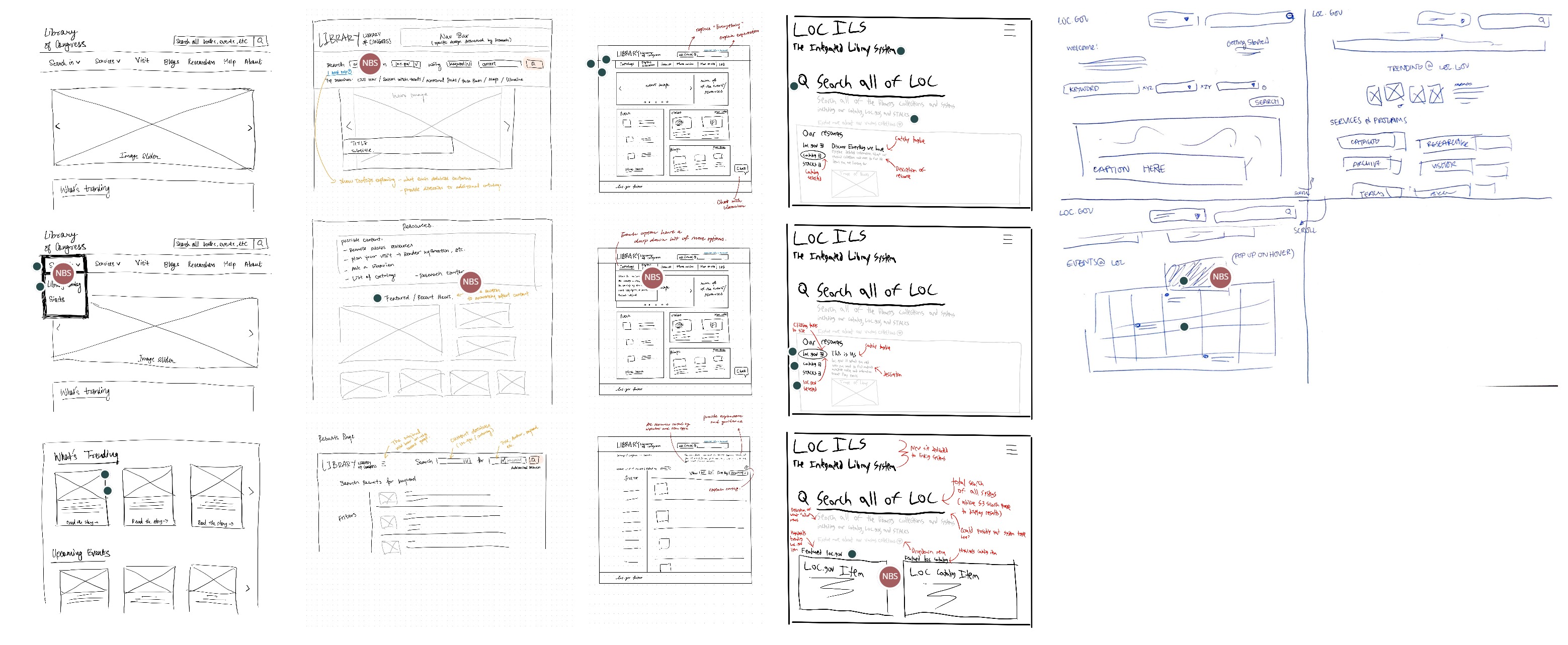
Sprint 4 — sketches (mine is second from the left)
Two trends emerged across all our sketches:
- None of the sketches contained actual content — I even annotated my sketch with a list of potential contents for each section.
- Three out of four sketches included a top navigation bar, which the current live site doesn't have.
To address the questions arising from these trends, I worked with the research group to design our first round of user testing. Each session consisted of a series of tasks evaluating the content and layout of the current site, a card-sorting activity to inform the design of the top navigation bar, and questions based on a preliminary version of the landing page.
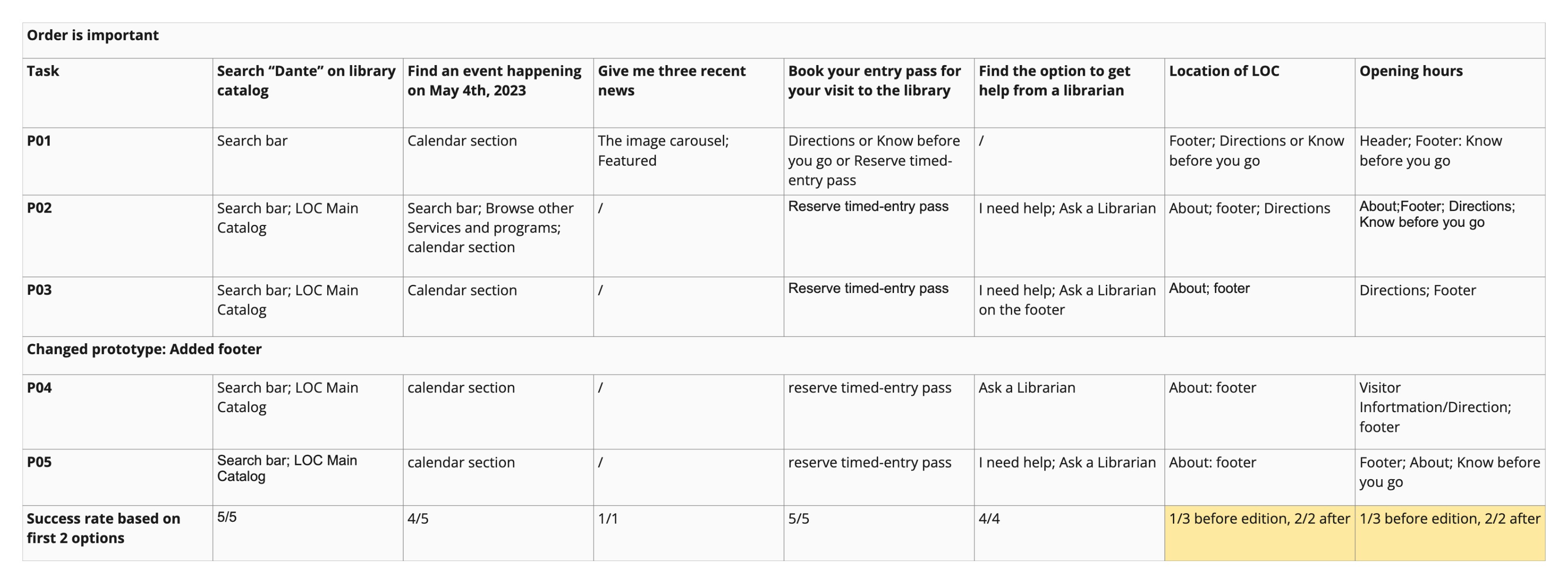
UXR findings — tasks
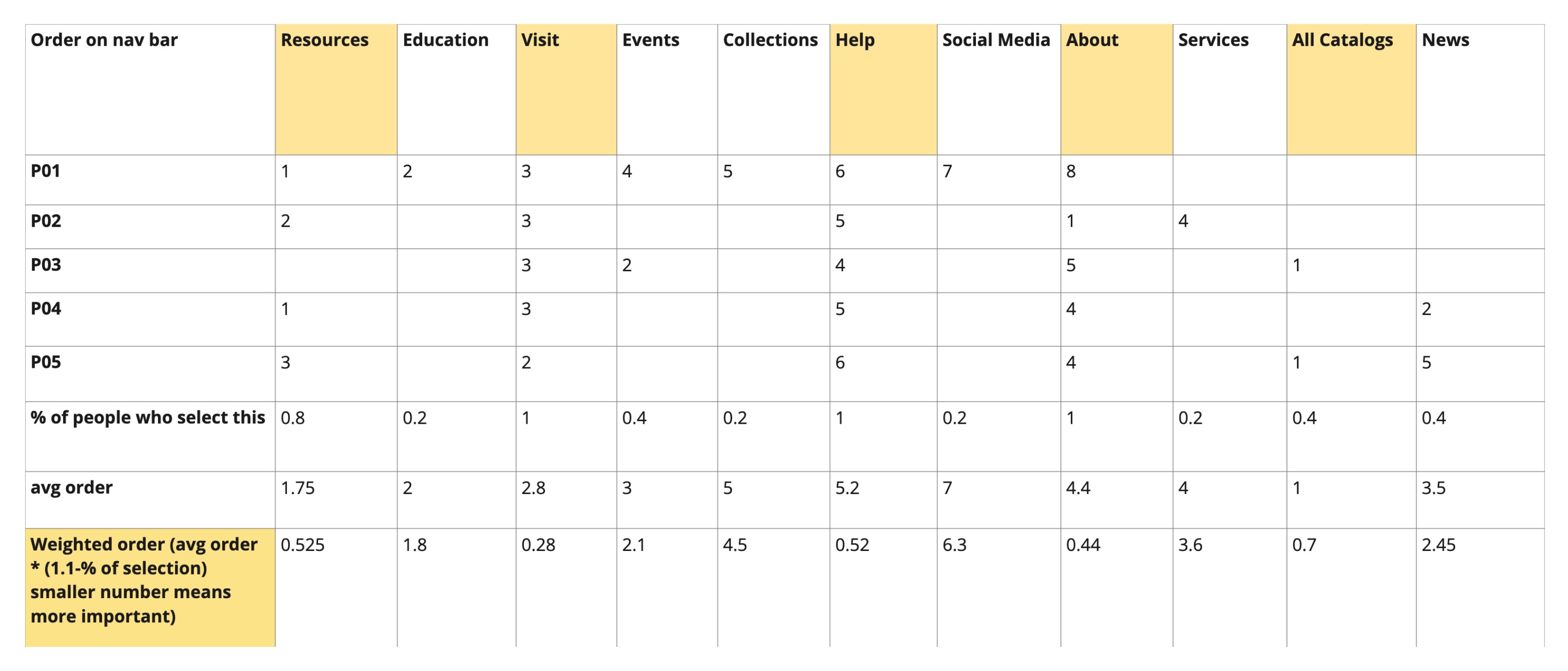
UXR findings — card sorting
Based on the task results, we concluded that the preliminary navigation bar design was successful — all five testers were able to complete the relevant discovery tasks using it, and the overall experience was further improved with a bottom navigation footer acting as a site map.
With a site map at the bottom, we had more flexibility in choosing what to display on the top bar. Our idea was to place the most important and most frequently accessed information on top for convenience. The card-sorting data, computed using MaxDiff analysis, helped us understand the priority of contents based on tester preferences.
Using these insights, I designed both navigation systems while my teammates worked on the landing page and prepared for testing.
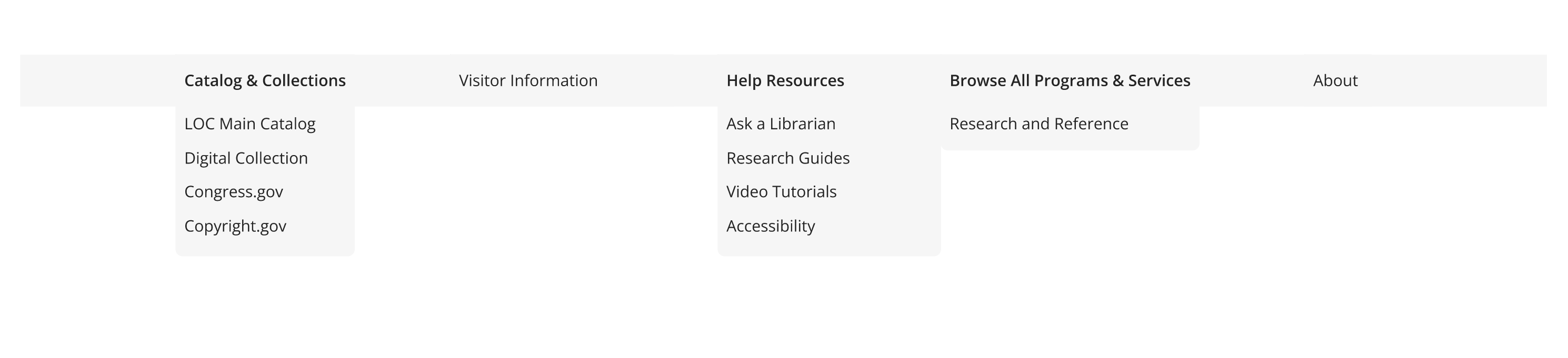
Top navigation bar
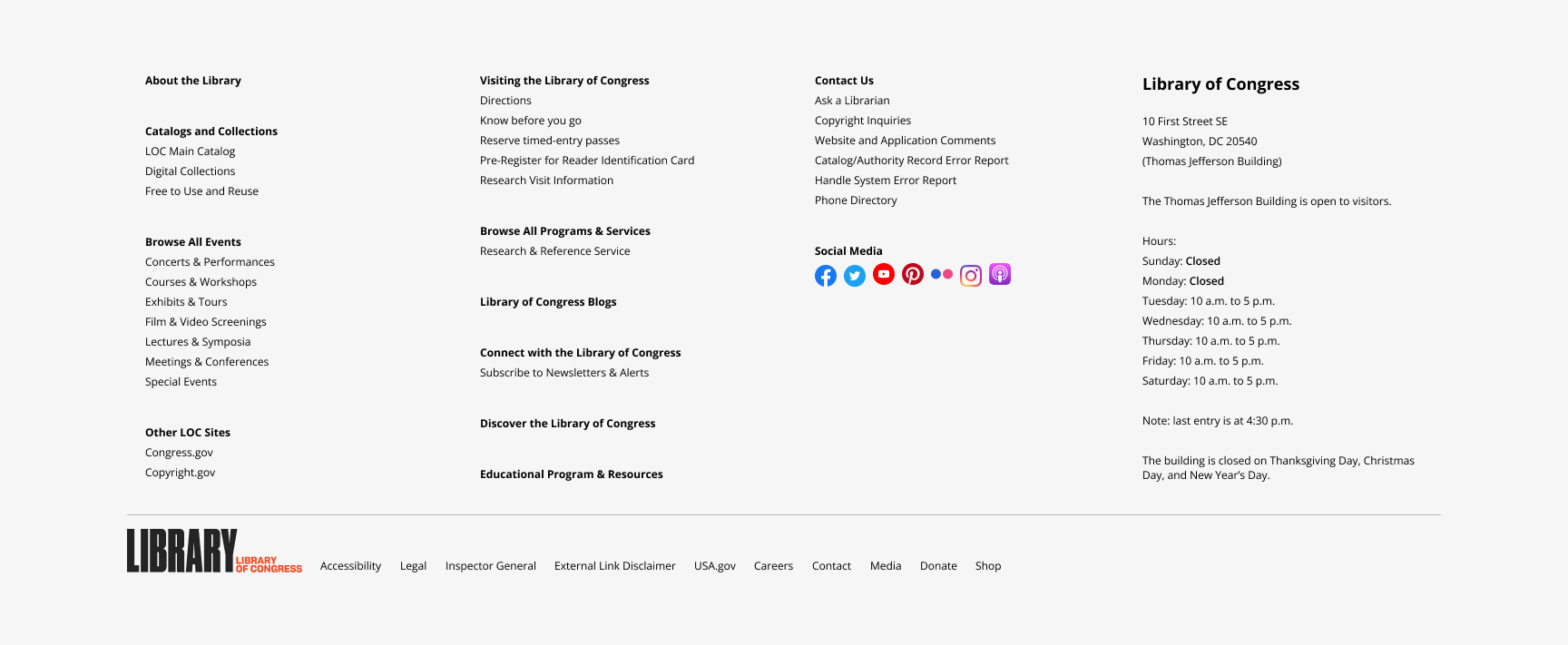
Footer navigation section
And here is the landing page prototype:
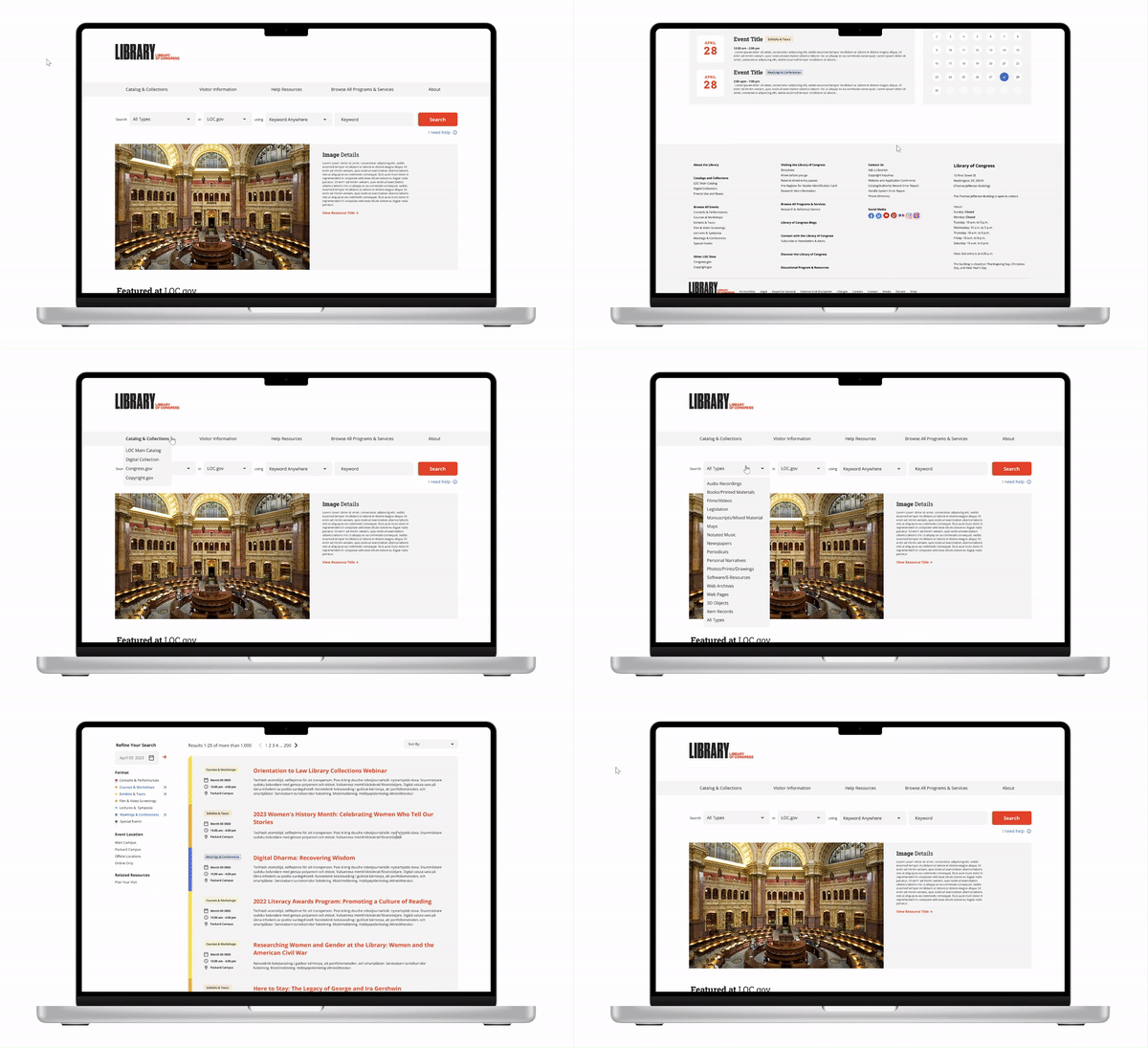
Sprint 4 — prototype walkthrough
During testing, we received positive feedback on the navigation systems but also found areas for improvement. Creating a complete navigation section for a site as vast as the Library of Congress was difficult due to the sheer number of pages and subpages, some of which overlap. During a weekly meeting, our client explained that they typically prefer creating new pages instead of modifying existing ones for convenience. As a result of this and organizational constraints, the bottom navigation includes the most popular pages, some necessary pages, and an overview of all categories that serve as entry points.
Up until Sprint 3, we had been using placeholder text for ease of prototyping. Working with the real architecture of the site was a valuable lesson in handling practical constraints. I realized that placeholder text gives more creative freedom, but since we were working on an existing site, we were deferring practical constraints until later sprints — a trade-off we made for the sake of time. This experience taught me the importance of good information architecture and how it can enhance or hinder design efforts.
We used the remaining four weeks to connect all the pieces together. Our game plan had three steps:
- Using our divide-and-conquer strategy, we assigned team members to the three areas (Catalog, Stacks, and loc.gov landing page) and edited the current prototypes based on feedback from their respective sprints.
- Meet with two UX experts from the Library of Congress to get feedback on the edited prototypes — pushing our design through another informal iteration.
- Incorporate expert feedback and finalize the prototype by linking everything together.
I took charge of editing the loc.gov landing page from Sprint 4. The comments from testing mostly concerned the top half of the page — the navigation bar and the search bar.
- The navigation bar and search bar were not differentiated enough
- I separated them by moving up the hero image carousel and redesigned the search bar to take up two rows for increased visual prominence.
- Users expect a search bar at the top right of the page for general information
- I designed a small search bar on the top right specifically for library information (services, programs, etc.), with a helper tooltip below to clarify its purpose.
- The purpose of some sections was unclear, partly due to placeholder content
- I incorporated actual images and writing from the current site.
I also introduced two additional changes:
- Uncollapsed the first tab of the navigation bar ("Catalog & Collections") so the Main Catalog and Digital Collection are easier to access directly, while congress.gov and copyright.gov remain accessible from the bottom navigation.
- Reintroduced the grid layout from the current design for "Featured at loc.gov" — compared to the simple three-column grid from the first iteration, the original grids showcase more content with their own visual hierarchy, which echoes our client's goal of showing the "richness" of the Library of Congress.
After these edits, the design was shown to two UX experts for evaluation. We addressed their key concern about accessibility with form fields by noting this as a design assumption to be handled on the development side with HTML <label> tags. The experts also pointed out a minor oversight — not including an option to see all programs & services under that tab — and suggested adding reading rooms as a frequent destination for some users.
Before and after:
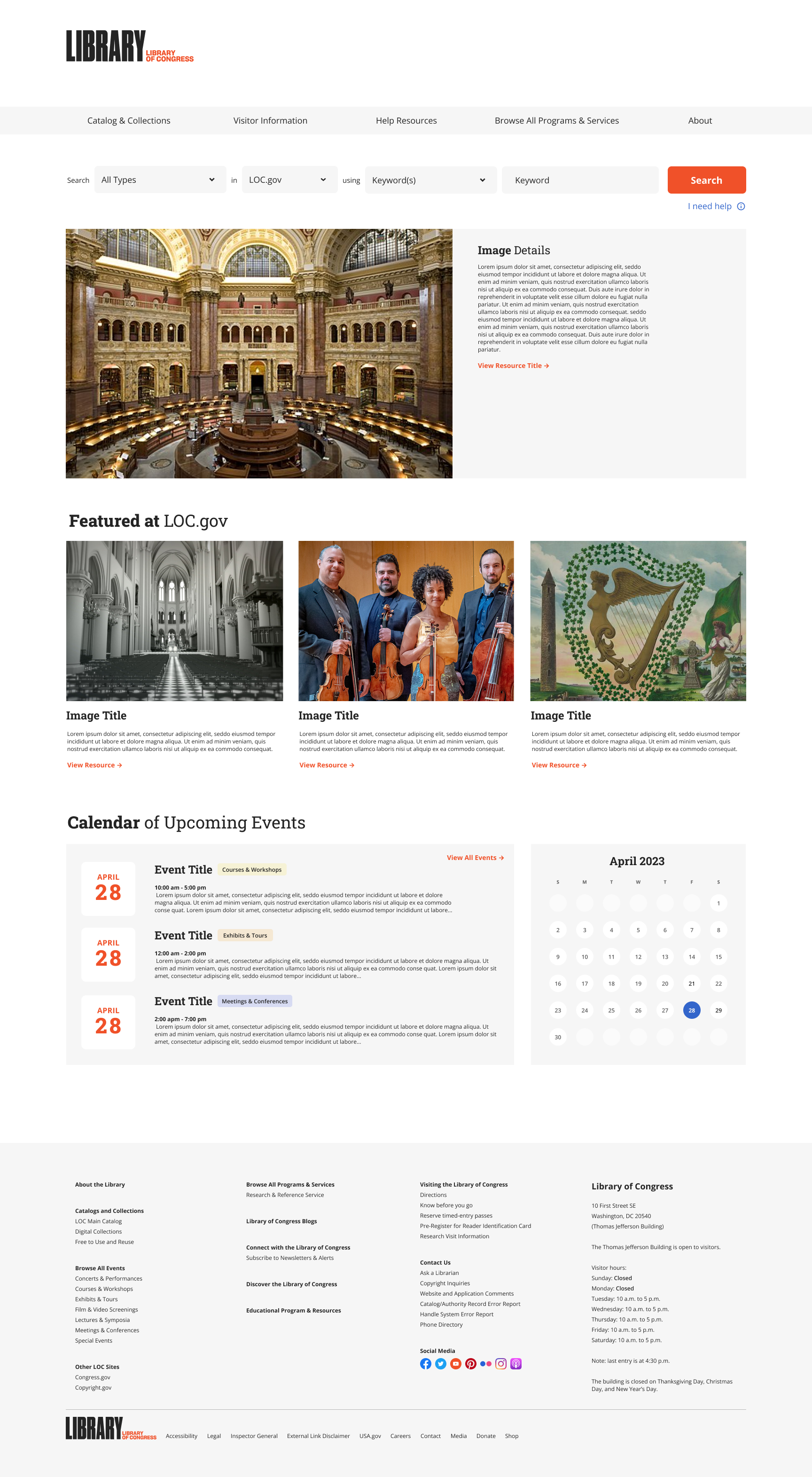
Before edits
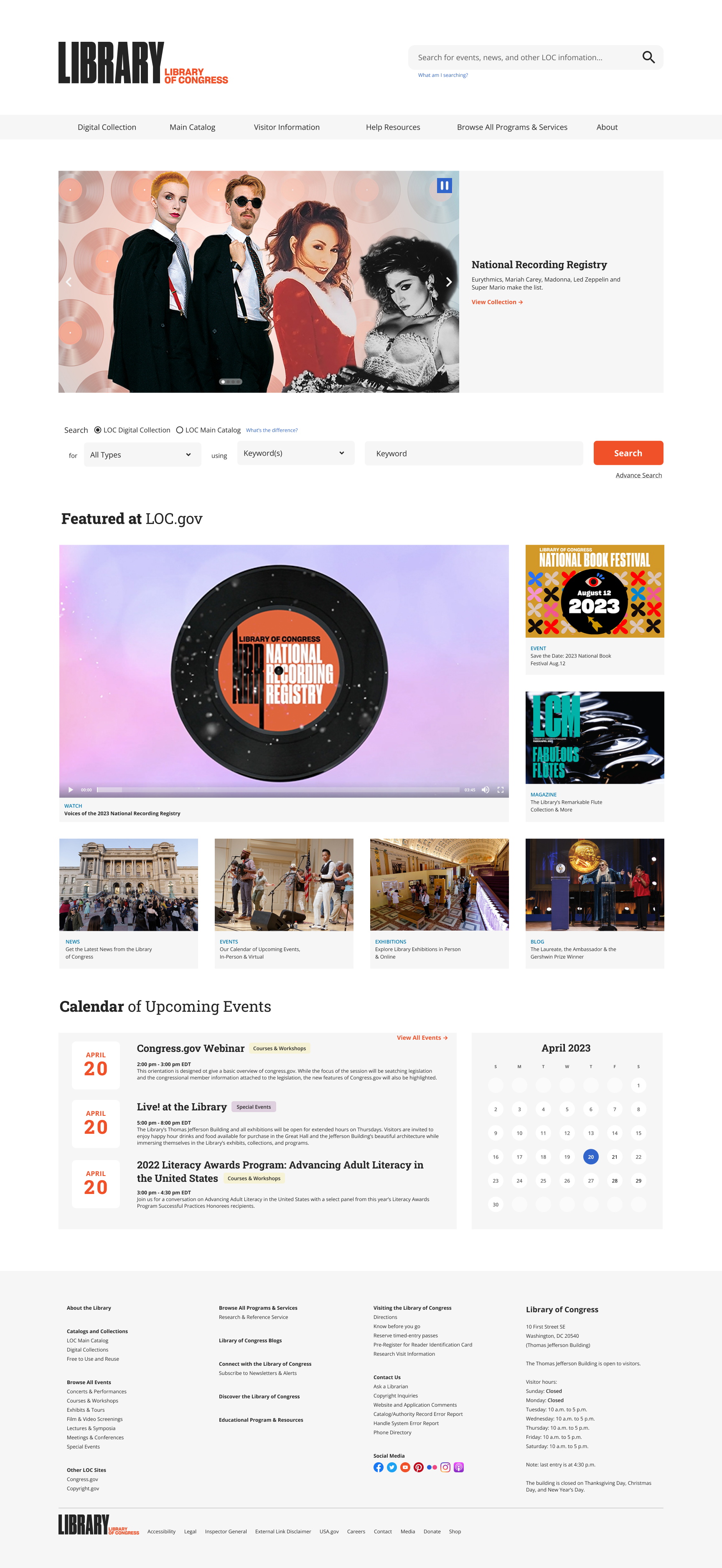
After edits
Final Words
Beyond the design-related activities, I took part in planning, editing user testing tasks, and proofreading the scripts used in testing sessions for all sprints. In Sprint 4, I also took on the role of facilitating work between the research and design teams — making sure questions from the design team were answered by the research team, and that all findings were translated into actionable ideas. This role required me to stay up-to-date with the progress and tasks of both teams while ensuring we met all deadlines set by our client and the capstone course.
I'd like to thank my team for trusting my judgment in making most of the internal decisions (supported by logical reasoning, of course). I'd also like to thank our client for being approachable and responsive. It has been a valuable experience taking part in this big mission by the Library of Congress, and I hope that some elements from our design will be live on the real site one day.